

Search “AI for Outlook email” and you’ll mostly find advice for clearing your own inbox. Faster replies, smarter sales follow-ups, a summary of that 40-message thread you’ve been avoiding. All helpful. None of it is written for the person hitting send on the company-wide update.
Internal communicators have a different problem. You’re writing one email for 500, 5,000, or 50,000 people, most of them will open it in Outlook, and if something’s wrong, everyone sees it at once. Usually within minutes. Usually with a reply-all.
So good AI means something different for you. It has to help you write, but it also has to catch mistakes before they go out, fit the message to each audience, and tell you afterward whether anyone read it. This guide covers what AI for Outlook email looks like through an internal comms lens, how it compares with Microsoft 365 Copilot, what to look for in a tool, and how ContactMonkey fits into your Outlook workflow.
What is AI for Outlook email?
AI for Outlook email is any AI capability that helps you draft, review, translate, personalize, or measure email sent from or alongside Microsoft Outlook. It comes in two flavors. Native AI, like Microsoft 365 Copilot, lives inside the Outlook window and helps individuals write and manage their own email. AI built into an internal communications platform that works with Outlook helps communicators design, check, send, and measure email that goes to the whole company, or any slice of it.
If you’re still new to internal comms or getting your team on the same page with the lingo, check out our internal communications glossary.
Why AI for Outlook email matters more for internal communicators in 2026
Almost everyone with Outlook has access to some form of AI now. Here’s why the stakes are higher on the internal comms team.
Why Outlook is still the main channel for internal email
Chat tools and intranets get plenty of attention, but for most organizations, internal email still lives in Outlook. Outlook and Microsoft 365 make up 88% of the platforms in the dataset behind ContactMonkey’s Internal Email Benchmark Report 2026, which covers more than 255,000 campaigns, and 84% of internal email opens happen on desktop. Those campaigns averaged a 76% open rate and a 9% click rate. Email isn’t going anywhere, which is why your choice of internal email platform, and the AI inside it, matters so much.
2025 internal email benchmarks are in!
See where you stand. Download our report to measure your performance.
Get the guide

How much time internal communicators spend on email
More than you’d like, probably. 73% of internal communicators spend 1 to 6 hours a week just formatting and sending emails, according to ContactMonkey’s 2026 Global State of Internal Communications Report (GSIC 2026). That’s roughly 240 hours a year per communicator.
Most of you are doing it on a small team, too. 49% of IC teams have 2 to 5 people, and 19% are a team of one. 78% of communicators say content and template creation eats up most of their time, while only 36% get to spend most of theirs on strategy. When you’re a team of two supporting a few thousand employees, AI inside your email workflow is one of the few ways to buy back strategic time without a new hire.
Why AI is the top priority for internal communicators in 2026
57% of internal communicators named AI in the workplace their top topic of interest this year, per GSIC 2026, ahead of employee experience (48%) and change management (43%).
That interest cuts two ways. You want AI to take work off your plate, and you’re increasingly the person helping everyone else figure out AI too. In her breakdown of 2026 employee engagement trends, internal comms leader Alyssa Towns points to Gallup research showing manager-led adoption is one of the top two drivers of frequent AI use at work. Managers lean on internal comms for the talking points and toolkits that make adoption stick, which is exactly why communicators need to lead the AI conversation inside their organizations.
AI for Internal Communications
From first draft to final send, ContactMonkey’s AI for internal communications works alongside you to make every message clearer, faster, and more impactful.
Explore all features
Why internal email mistakes cost more than personal email mistakes
A typo in a personal email reaches one person. A wrong date or broken link in a company-wide announcement reaches everyone, and then you send the correction, and now employees have two emails about the same thing. 44% of communicators had to resend or correct an internal email at least once last year, per GSIC 2026.
That’s why the most useful AI for internal email is often the AI that reviews your message before anyone else sees it. Checking every link before you hit send is one of the oldest internal email best practices for a reason.
Microsoft 365 Copilot in Outlook vs. AI built for internal communications
Microsoft 365 Copilot brings AI straight into Outlook. It can draft messages, summarize long threads, and suggest tone and clarity tweaks. For your own inbox, it’s genuinely useful. But it was built around one person’s email, and the all-staff update is a different animal.
| Microsoft 365 Copilot in Outlook | AI built for internal communications | |
|---|---|---|
| Built for | Individual emails and replies | One message sent to thousands of employees |
| Design | Text drafting in the compose window | Branded, mobile-ready HTML templates |
| Audience | Recipients you add yourself | Segments by department, location, or role |
| Pre-send review | Tone and clarity suggestions | Link, consistency, accessibility, and readability checks |
| Measurement | Read receipts at most | Opens, clicks, read time, and feedback by segment |
You don’t have to pick one. Plenty of communicators use Copilot for their day-to-day email and a dedicated platform for company-wide sends. Just don’t expect a personal email assistant to do the job of an internal comms platform.
How to choose an AI email assistant for internal communications
Demos always look great. The real test is whether a tool holds up on the email you actually send every week. Here’s what to look for:
How to test an AI email assistant on a company-wide email
Give every tool the same real brief, like a benefits enrollment reminder that needs different details for three locations, and compare what comes back. A tool that writes a lovely reply to a colleague can still hand you a wall of text nobody finishes. You want a structured, scannable layout that works on desktop and mobile, plus subject lines that actually earn the open.
Why pre-send quality checks matter as much as AI drafting
Drafting speeds you up. Review protects you. Look for AI that checks for broken links, mismatched dates, accessibility issues, and readability before an email goes out, and lets you add your own rules for things like product names or approved terminology. If a tool only writes, you’re still on the hook for manual QA on every send.

How AI email tools should handle segmentation and personalization
Almost nothing you send is relevant to every single employee, and employees know it. 63% of internal communicators say employees engage only occasionally, when content feels relevant, per GSIC 2026. Your AI should work hand in hand with audience segmentation and dynamic content, so one email can carry different details for different teams.
Internal comms leader Alyssa Towns has a simple rule for personalizing internal emails. Reference someone’s role, location, or team, never their individual behavior, or personalization starts to feel like surveillance.
How to evaluate AI email assistant security and Microsoft 365 integration
You’re handling employee data and news that hasn’t been announced yet, so ask the boring questions early. Is the vendor SOC 2 compliant? Does it use your drafts to train its models? Does it connect to Outlook and Microsoft 365 through Microsoft’s supported integration methods? Your IT team will ask all three, so it helps to have answers first. If you want a starting point, ContactMonkey publishes both its security practices and its AI policy.
How to measure internal email performance after you send
An AI tool that helps you write but can’t tell you whether anyone read the email only solves half the problem. Look for opens, clicks, and read time broken down by segment, plus a way to ask questions about that data without building a spreadsheet. If you’re not sure which numbers to report, start with the internal email KPIs leadership actually asks about.

How AI improves internal email writing
AI is great at the repetitive parts of internal email and much weaker on judgment. Here’s where it helps most, and where you still need to be the one making the call.
How AI speeds up first drafts of internal emails
Give AI the audience, the goal, and your key points, and you’ll have a structured first draft in seconds. Your job shifts from writing to editing, which is faster and usually produces a better email anyway. The AI prompt library has ready-made prompts for announcements, newsletters, surveys, and change comms. They work best when you start from a clear internal communication goal, like driving action on a deadline or building awareness of a new policy.
How AI makes internal emails clearer and easier to scan
AI is good at the edits you’d make if you had another hour. Breaking up dense paragraphs, tightening sentences, suggesting a sharper subject line or call to action. That matters because 56% of internal communicators say employees sometimes miss key updates, and 30% say it happens often or very often, per GSIC 2026. The easier an email is to scan, the harder it is to miss.
How to automate a recurring employee newsletter with AI
Recurring newsletters are where AI saves the most time over a year. Build one reusable template, let AI draft the repeatable sections like leadership updates or team spotlights, and swap in the new details each cycle.
Run a pre-send check every time, though. Recurring emails are exactly where copy-and-paste errors love to hide. And for employees who’d rather read outside their inbox, Pages turns any newsletter into a shareable web page.
How AI translates internal emails for multilingual teams
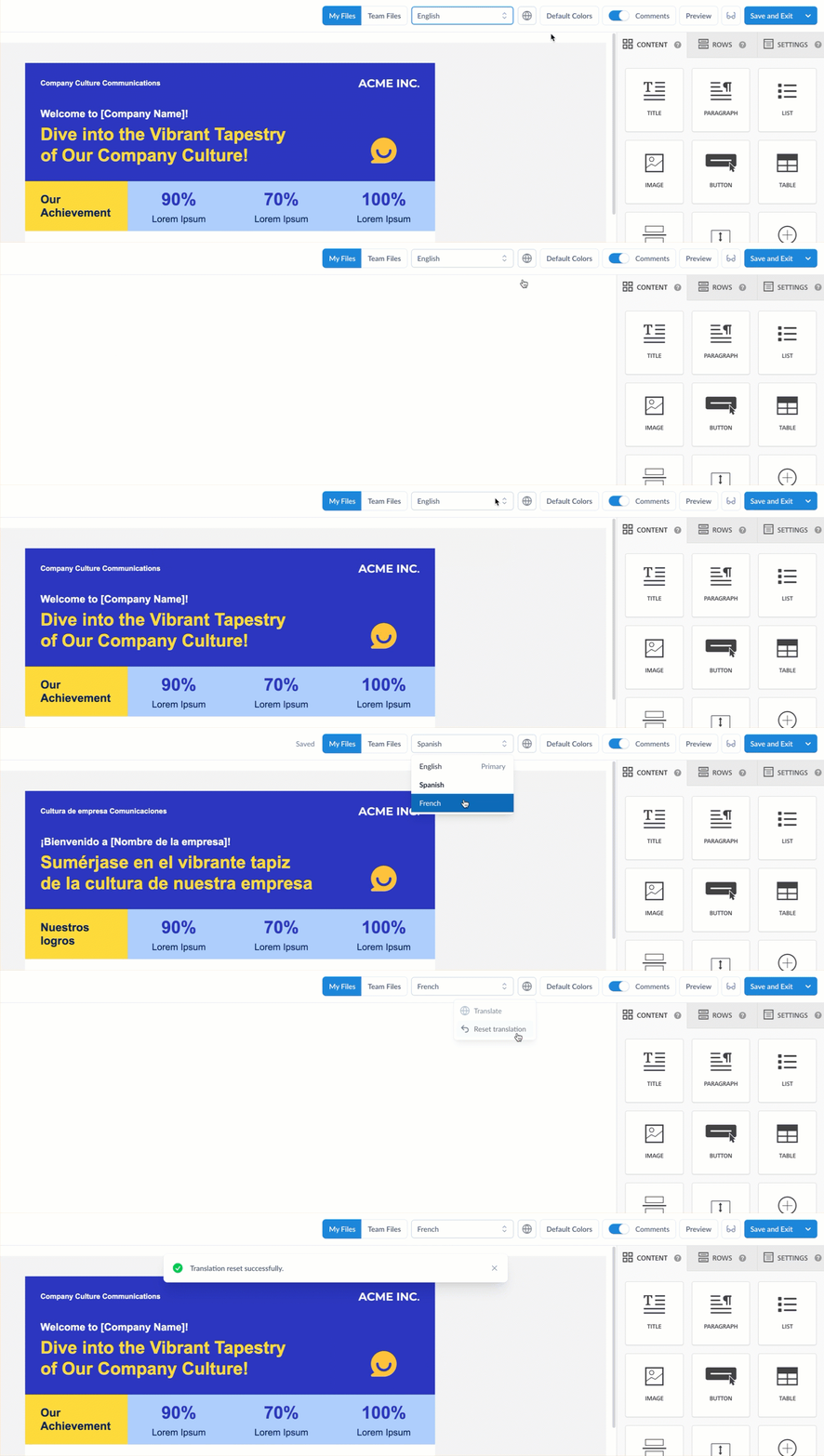
If your workforce speaks more than one language, AI translation is probably your fastest win. You write one message, and employees in every region get it in their own language at the same time, with no separate vendor workflow. Multi-language emails handle this from a single build, which helps a lot when you’re trying to reach frontline and deskless workers on tight shift schedules. Just have a fluent reviewer check safety and policy content before it goes out.
When internal communicators shouldn’t use AI to write emails
Some messages need a person’s fingerprints on them. AI doesn’t know your company’s history, how employees are feeling this week, or which topics need extra care. And trust is already fragile. 58% of internal communicators say employees mostly trust information from leadership, but fewer than 9% say employees trust it completely, per GSIC 2026.
For layoffs, restructuring, policy changes, and leadership messages, use AI to organize your notes if you like, but write and approve the final version yourself. Approval workflows make that sign-off step part of the process instead of a hallway conversation.
How to use AI for Outlook email, step by step
- Start with the goal and audience. Decide what employees need to know or do, and which groups need different details.
- Draft with AI. Give your AI email builder the goal, audience, and key points, and let it handle the structure and first draft.
- Edit for voice and accuracy. Check every fact, date, and name, and rewrite anything that doesn’t sound like your company.
- Personalize by segment. Use dynamic content so each audience sees only the details that apply to them.
- Run a pre-send check and preview each audience. Catch broken links, inconsistencies, and accessibility issues, and confirm each segment sees the right version.
- Get approval and send through Outlook. Route sensitive messages for sign-off, then send to your employee list.
- Measure and learn. Review opens, clicks, read time, and responses to embedded pulse surveys by segment, and carry what you learn into the next send.
How ContactMonkey brings AI into your Outlook workflow
ContactMonkey is the agentic internal communications platform built to work alongside Outlook and Gmail. You create, approve, send, and measure branded employee emails from the inbox you already live in, with AI built into every step. Here’s what each piece does.
CoAuthor, an AI email builder for internal comms
CoAuthor turns a plain-language prompt into a structured, mobile-ready, accessible email, layout and copy included. Tell it the audience, purpose, and key points, and you get a first draft to edit instead of a blank screen. It can also rewrite sections for clarity, tone, or a stronger call to action, and clean up messy drafts so they’re easier to scan. CoAuthor is currently in beta, and you can try CoAuthor free for your first three emails.

ConfidenceCheck, an AI pre-send email checker
Think of ConfidenceCheck as the second set of eyes you never have time to find at 4:55 pm. It reviews every email before you send it, validating links, flagging date discrepancies and mismatched copy, catching accessibility issues, estimating read time, and calling out overly complex copy. You can also set custom checks for your organization’s language standards and terminology. It’s the only native pre-send quality check in the internal communications platform category, and the easiest way to keep your next email out of that 44%.


Audience Preview, a pre-send preview for every employee segment
Ever sent something that made perfect sense to head office and landed completely wrong with the field? Audience Preview simulates how different employee segments will experience your message before it hits an inbox. You can see how an email reads for frontline teams, managers, and head office staff, spot where a group might take it differently than you intended, and adjust the tone or framing before you send.

Insights Assistant, AI analytics for internal email
Insights Assistant lets you ask your data a question and get an answer. Skip the dashboard digging and ask something like which location had the lowest read time this quarter. It monitors campaigns and surfaces trends, so what you learn from one send shapes the next. It sits on top of ContactMonkey’s email analytics, so you can go from a quick answer to the full picture of your internal email engagement when leadership wants the details.
How Freedom Mobile improved internal email read rates
“ContactMonkey really does allow our teams to be creative, but also provides the analytics to make sure we’re doing the right things.”
Jeremy Roberts, Senior Manager of Communications, Go-To-Market and Incentives at Freedom Mobile, saw a 40% boost in read rates and 15% higher open rates with ContactMonkey.
Outlook email is only one piece of AI in internal communications, which also spans feedback analysis, translation, reporting, and how your company talks about AI itself. To see ContactMonkey’s AI features on your own Outlook setup, book a demo and we’ll build and send a real employee email together.
FAQ
Does Outlook have AI built in?
Yes. Microsoft 365 Copilot adds AI to Outlook, depending on your Microsoft 365 plan, and helps users draft emails, summarize threads, and improve tone and clarity. It’s designed for individual email, so internal communicators sending to large employee audiences typically pair it with a dedicated internal communications platform.
What is the best AI email assistant for Outlook?
It depends on the job. For individual replies and inbox management, Outlook’s built-in AI works well. For internal communications, the best AI email assistant pairs AI drafting with pre-send review, audience segmentation, and post-send analytics, all built for company-wide employee email. Comparing AI tools for internal communication by use case is the fastest way to narrow the list.
What is an AI email writer for Outlook?
An AI email writer for Outlook generates draft copy, such as an announcement or newsletter section, from a short prompt, which a communicator then edits before sending. For internal comms, the most useful version also formats the draft into a ready-to-send, mobile-friendly email instead of plain text alone.
Can you automate an employee newsletter with AI?
Partly. AI can draft repeatable sections from a template each cycle, and you swap in new details, review, and send. Keep the review step, since recurring newsletters are where copy-and-paste errors are most common.
Does Outlook have email templates?
Outlook has basic email templates and stationery options, but they’re limited compared with what internal comms teams need, like branded, mobile-responsive templates with personalization and embedded surveys. That’s why most internal comms teams build templates in a platform layered on top of Outlook with a dedicated email template builder.





