Multi-Language Emails
Send one email and every employee reads it in their own language
Write your internal email once, translate it into up to 25 languages, and send it to your entire workforce in a single send. ContactMonkey delivers each employee only the version in their preferred language, using the language data already in your Azure or Workday sync or your recipient CSV, and anyone without a language on file receives the default version you choose.


New
Preferred Language Delivery
Preferred Language Delivery will let you send one multi-language email to your full audience and deliver each employee only the version written in their preferred language. ContactMonkey reads each recipient’s language from your recipient CSV or from your Azure or Workday sync, and anyone whose language is unknown receives the default version you choose for that email.
Move past slow email setups with a builder that speaks your languages
Inaccurate translations
Copy-and-paste workflows often cause inconsistencies and mistranslations that confuse employees and hurt trust.
Send one email in up to four languages so every employee can read, understand, and act. No more language gaps or missed messages.
Wasted time on repetitive work
Manually recreating multiple versions of the same email takes hours, and leaves room for human error.
Build once, translate once, send everywhere. Cut repetitive tasks and keep every version on-brand and error-free.
Fragmented reporting
Duplicating emails means scattered analytics. You can’t easily measure engagement by region or language.
Track opens, clicks, and engagement by language, all in one dashboard. See what resonates and improve your global comms.
Top reasons to choose ContactMonkey
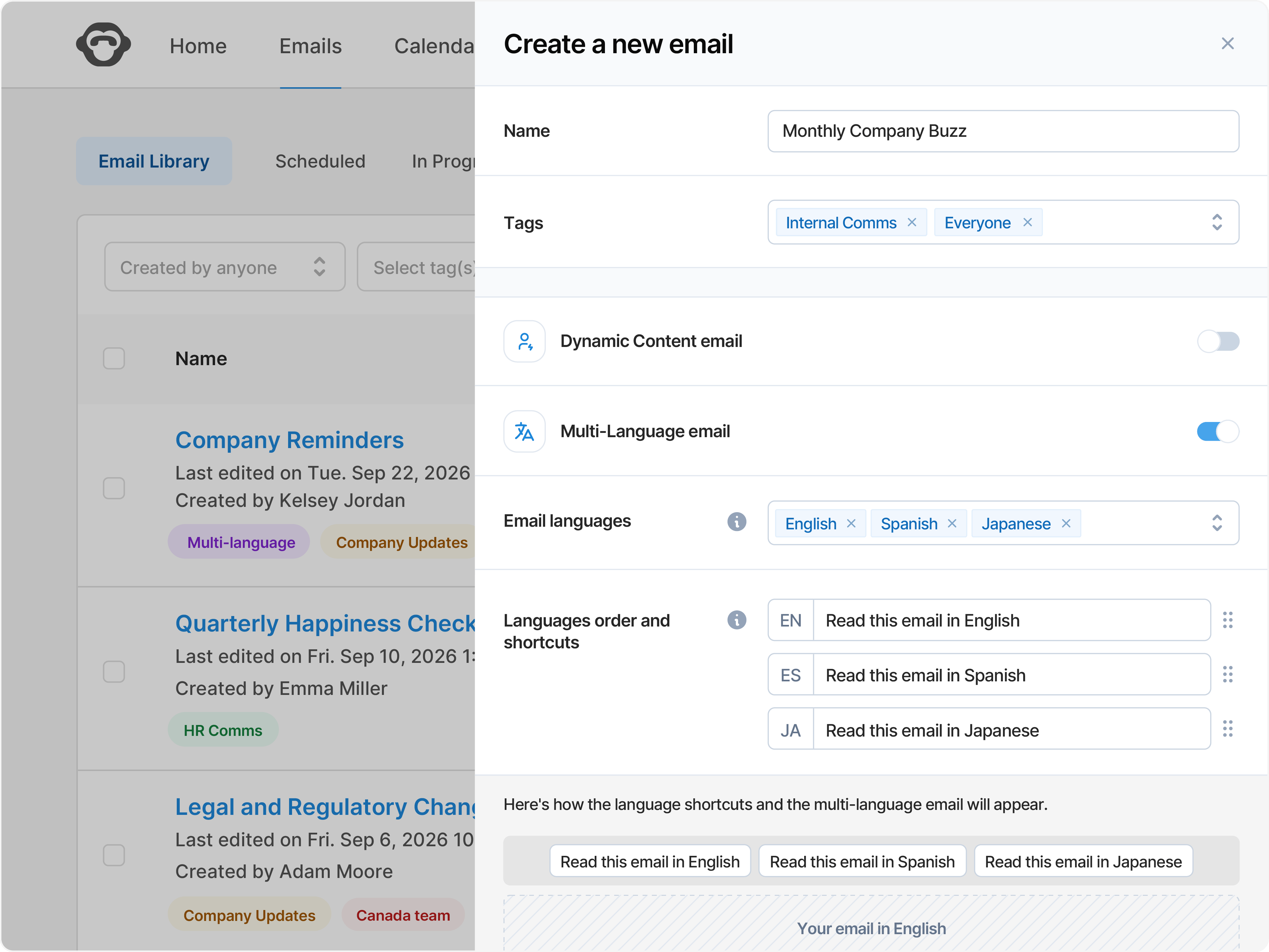
Communicate inclusively across global teams: deliver updates in up to four languages per email so everyone feels seen, informed, and engaged.
Save hours of repetitive work: build once, translate once, and send seamlessly to all regions.
Ensure accuracy and brand consistency: no copy-paste errors or off-brand versions.
Get unified analytics: measure performance by language and region in one dashboard.
Simplify workflows for global comms: send to up to 10 segmented lists per row Secure, Outlook- and Gmail-native integration: send directly from tools your teams already use, with full IT compliance.
“Before Contact Monkey, we had nothing. We had no benchmark. We had no idea what messaging was getting to our employees, how they were best receiving it. We had very limited two-way feedback loops.”
Jerilyn Hall
Employee Communications Manager
40–50%
of deskless workforce now reached

Watch video
“[ContactMonkey] really does allow our teams to be creative, but also provides the analytics to make sure we’re doing the right things.”
Jeremy Roberts
Sr. Manager of Communications, Go-To-Market & Incentives
40%
read rate boost
15%
higher open rates

Watch video
“ContactMonkey’s Dynamic Content tool saves me hours. I no longer need to copy, paste, or duplicate emails. It saves time, brain space, and prevents duplication errors.”
Emily-Rose Carr
Internal Communications Specialist
~60%
open rates
~19%
click rates

Watch video
With dynamic content, I can build one email with multiple blocks, with each block tailored to a group. I’m not duplicating emails or copy/pasting. It saves time and reduces mistakes.
James Maiden
Sr. Manager of Communications, Go-To-Market & Incentives
5x
faster email creation

Watch video
“Data helps drive informed decision-making. With appropriate feedback, we’re now able to analyze and change our strategy.”
Lindsey Champagne
Director of Communications and PR
13%
average click rate


“Our team’s efficiency was slowed down by the lack of sophistication of our previous tool. And we knew employees weren’t getting the information—they were flagging it as phishing.”
Tamara Palmer
Employee Engagement & Internal Communications Lead

Frequently asked questions
You can include up to four translated versions in a single email campaign.
You can either paste your own translations or use ContactMonkey’s integration with AI-assisted translation tools for faster setup.
“Yes. You can send each language version to its own employee list, with up to 20 segmented languages per email. Preferred Language Delivery removes that step by matching each recipient to their preferred language automatically.”
Preferred Language Delivery, which is coming soon, will do exactly that. You build your email in every language you need and send it once, and each employee receives the single version that matches their preferred language. The feature will roll out gradually and will be included at no extra cost on plans that include Multi-Language Emails.
Absolutely. You’ll see opens, clicks, and read time by language, helping you measure engagement globally.
Yes. ContactMonkey is SOC 2 compliant, supports SAML SSO, and integrates securely with your existing IT environment.