Most internal communicators did not choose their first internal email software. They inherited it, a shared inbox, a mail merge process, or whatever the previous person on the team set up. ContactMonkey’s 2026 Global State of Internal Communications (GSIC) Report found that 78% of internal communicators say creating content and templates takes up most of their time, while only 36% spend most of their time on strategy. A lot of that gap comes down to software that was never built for the job, and 73% of communicators still spend one to six hours a week on the mechanical work of designing, formatting, and sending a single internal email. A lot of that gap comes down to software that was never built for the job.
This guide covers what internal email software actually is, the main types on the market in 2026, the features worth prioritizing, and how to evaluate your options with real benchmark data.
What Is Internal Email Software?
Internal email software is a platform built specifically to create, send, personalize, and measure email communications to employees, as opposed to customers or prospects. It differs from marketing email software in almost every meaningful way. There are no unsubscribe links to manage, no spam-driven deliverability battles with a cold list, and no revenue-per-click metric to optimize toward. Instead, internal email software has to answer a different question. Did the right employees see this, understand it, and do something with it.
What internal email software replaces
Most internal communications teams do not adopt internal email software from a blank slate. They are moving off one of three setups, and each one leaves a specific gap that dedicated software is built to close.
- A shared inbox or distribution list, which gives no visibility into who opened a message or clicked a link
- A mail merge process built in Word or Excel, which breaks down as soon as the employee list changes or a message needs personalization by department
- A marketing platform repurposed as an internal email tool, which can send the message but was never built to segment by role, location, or reporting line
If any of those describe your current process, the resend and correction rate GSIC 2026 uncovered helps explain why. 44% of communicators had to resend or correct an internal email one to two times in the past year, and another 27% did so three to five times. Pre-send checks and reusable templates are built to close exactly that gap.
Who typically owns internal email software
The buyer varies with company size. At larger organizations, it is usually an Internal Communications Director or VP working alongside HR and employee experience leaders, often managing a list of 1,000 or more employees and answering to IT and legal on data governance. At smaller and mid-sized organizations, it is frequently a single Communications Manager or Specialist running the entire program, which is why ease of setup and time to first send matter as much as feature depth.
If you are new to the category and want a quick reference for adjacent terms like internal communications platform or employee engagement, ContactMonkey’s internal communications glossary is a useful companion as you read the rest of this guide.
How is internal email software different from an intranet?
An intranet is a destination employees have to visit. Internal email software delivers the message directly into a channel employees already check multiple times a day. ContactMonkey’s 2026 Internal Email Benchmark Report found that Office 365 accounts for 88% of the internal email platforms analyzed across more than 255,000 campaigns, with Outlook Desktop and Gmail making up most of the rest. That concentration is why internal email software is built to work inside Outlook and Gmail specifically. Employees do not have to log into a separate portal to see it. Most organizations end up running both, using the intranet as a searchable archive and internal email as the delivery mechanism that actually gets read.
What Types of Internal Email Software Are There in 2026?
Not every option in this category does the same job. Understanding the type you are looking at before you start comparing tools makes the rest of the evaluation much faster.
Dedicated internal communications email platforms
This kind of internal communications email software is built specifically to create, send, segment, and report on internal email, distinct from anything designed for external or customer-facing campaigns. It typically plugs directly into Outlook or Gmail so communicators can build and send from the inbox they already use, while giving IT and security teams the audit trail a general marketing platform was never designed to provide. These platforms are built around employee data, not a marketing contact list, so they tend to offer deeper audience segmentation by department, location, or job function, along with analytics that keep an employee’s engagement separate from a customer’s.
Outlook and Gmail add-ins for internal email
Some employee email software installs as an add-in inside your existing email client without replacing it. This approach keeps the sender’s own inbox and identity intact, which matters for messages that need to look like they came from a specific leader or manager and not a generic company account. The tradeoff is that add-ins vary widely in how much analytics and workflow depth they offer beyond the send itself. It is worth checking whether reporting, approvals, and templates live inside the add-in or require switching to a separate dashboard.
Repurposed marketing email software
Some organizations still send internal email through a marketing platform originally built for customer campaigns. It can technically send a mass email, but it usually lacks internal-specific features like org chart segmentation or analytics that separate an employee’s engagement from a customer’s. There is also a practical delivery risk worth flagging. Marketing platforms are built and authenticated for external sending, so internal messages sent through them can land in spam or promotions folders more often than messages sent through internal communications software built to deliver inside the corporate inbox.
Looking for a side-by-side comparison of specific platforms? ContactMonkey’s guide to the best internal email platforms ranks the leading options for 2026.
What Features Should Internal Email Software Include?
Does internal email software need built-in analytics?
Yes, and this is one of the clearest gaps between internal-specific software and repurposed marketing tools. GSIC 2026 found that 65% of internal communicators use open and click-through rates as one of their primary ways to measure internal communications effectiveness, but that only works if the software reports on internal recipients specifically. Look for internal email software with analytics built around employees, meaning click maps, device breakdowns, and read-time data, not just a generic open rate pulled from a blended marketing dashboard.
AI-assisted writing and pre-send review
Artificial intelligence in the workplace is now the single topic internal communicators are most focused on for 2026, cited by 57% of GSIC 2026 respondents, ahead of every other listed priority. In practice, that shows up in internal email software as AI drafting support and pre-send review that checks tone, links, and formatting before a message goes out to thousands of employees.
ContactMonkey’s guide on how internal communications teams can use AI in 2026 breaks down where AI actually adds value versus where a human still needs to make the call. If you want to see practical prompts for this kind of work, ContactMonkey’s AI prompt library is worth reviewing, and the CoAuthor free trial is a hands-on way to test AI-assisted drafting before committing to a platform.
Employee surveys and feedback tools
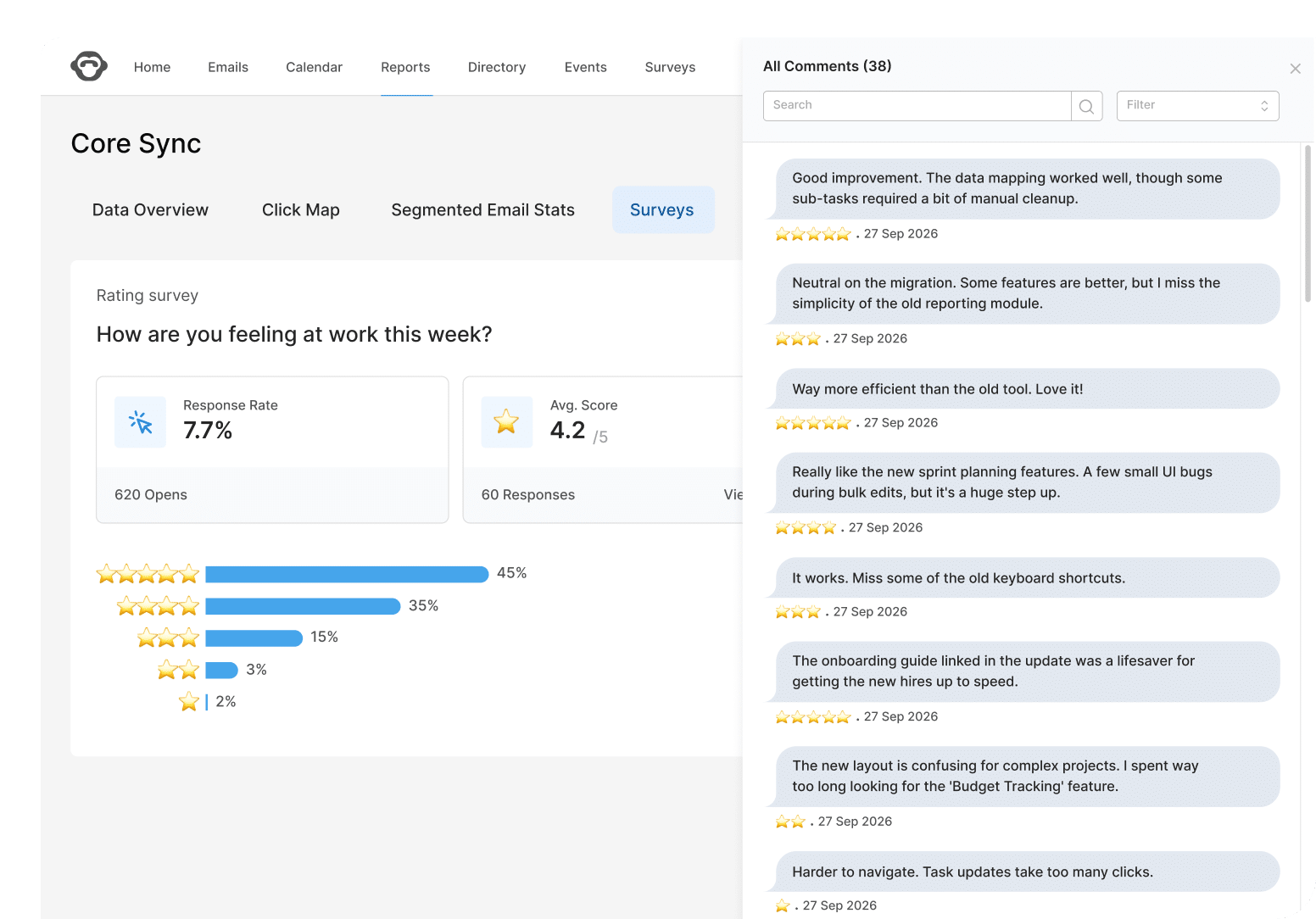
Standalone survey links get less employee engagement than a question embedded directly in the email itself. GSIC 2026 found that 95% of organizations already collect employee feedback in some form, so the more useful question is whether your internal email software lets you collect it inside the message employees are already reading, through a pulse survey or a simple emoji reaction. ContactMonkey’s complete guide to employee pulse surveys covers how to structure the questions themselves once you have the software to deliver them.

Segmentation and audience targeting
Internal communications leader Alyssa Towns recently analyzed the employee engagement trends redefining the workplace in 2026, and one of her biggest takeaways was that personalization is no longer optional.
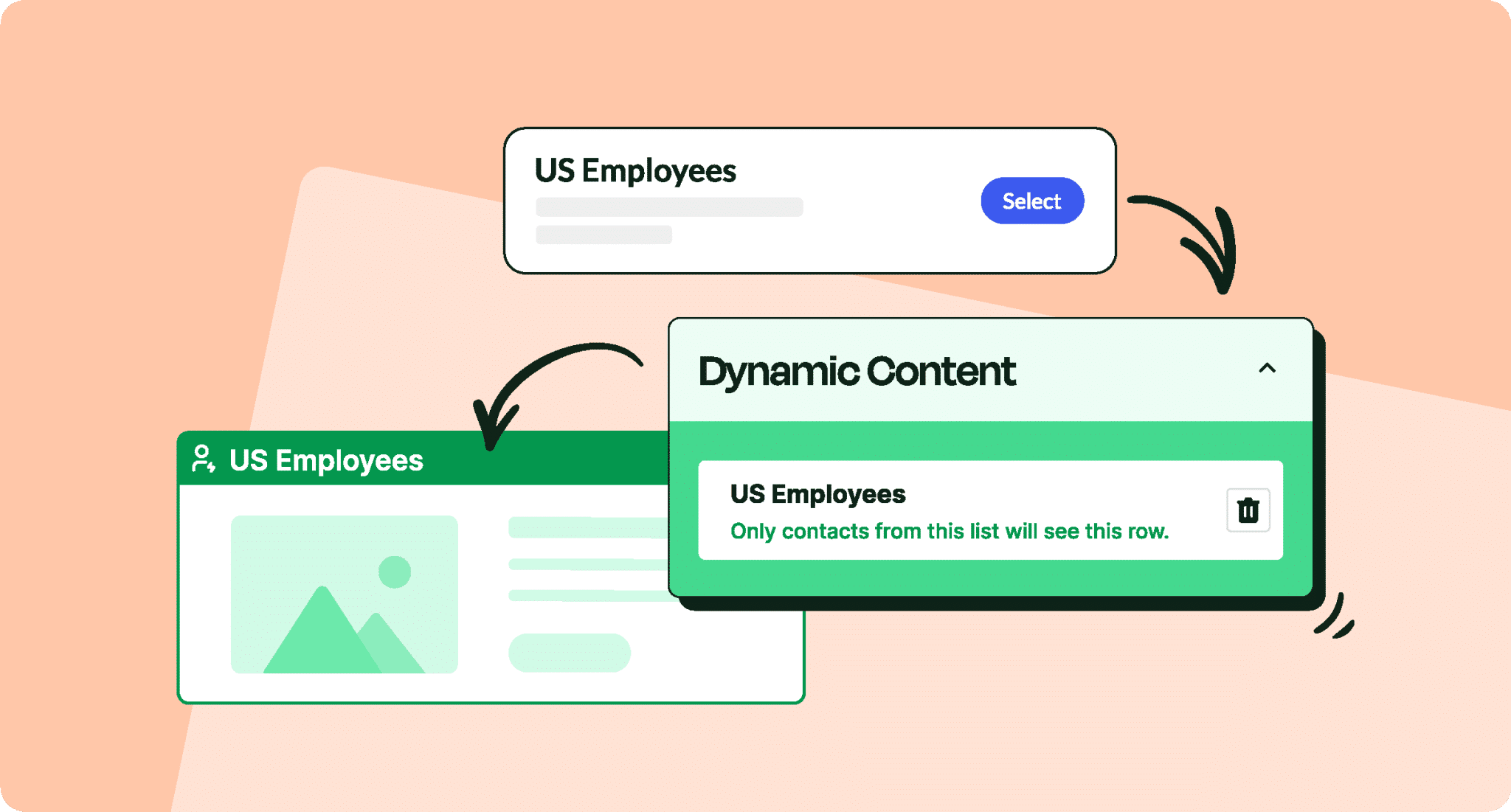
Sending the same message to every employee is one of the fastest ways to get ignored. The features worth evaluating here are the ability to segment by department, location, or job function, and the ability to personalize a single email template for multiple audiences without building a separate draft for each group. Dynamic content, where one email adapts its content block by block depending on who is opening it, does exactly that.
Native Outlook and Gmail integration
A platform that lives inside the inbox your team already uses removes an entire category of adoption friction. Internal communicators skip learning a second interface, and messages are more likely to render correctly because they are sent through the same client employees use every day. This also matters for ghostwriting and send-as permissions, since messages sent on behalf of an executive or a team need to originate from an inbox employees recognize.

Accessibility and compliance features
This is easy to overlook until it becomes a problem, particularly for organizations in healthcare, finance, insurance, or other regulated industries where communications go through review. An accessibility checker that flags contrast, alt text, and screen reader issues before a message sends protects both the employee experience and the organization’s compliance posture. Lockable branding elements and an audit trail of who approved and sent each message serve the governance side of the same need, giving IT and legal the record they require without slowing the communicator down.
How Do You Choose the Right Internal Email Software for Your Team?
Feature comparisons only get you so far. A few criteria matter more than a spec sheet suggests.
- Reliability and support, since a platform that goes down or leaves you without help during a send is a bigger risk than any missing feature
- Native integration with Outlook or Gmail, so senders are not learning a second interface just to send an email
- Segmentation depth, including the ability to target by department, location, or HRIS field, not just an email list
- Reporting that isolates internal engagement, separate from marketing metrics
- Transparent pricing and a clear rollout timeline, since neither is something you should have to request three sales calls to find out
What to prioritize as a lean internal communications team
If you are running internal communications alone or as a team of two, the features that save you time every week matter more than the features you might use once a quarter. Prioritize a drag-and-drop builder and a template gallery, an AI workflow assistant that can turn a rough draft into a formatted send, and reporting simple enough to hand to your manager without a separate analyst pulling the numbers together. Fast setup matters too. A platform that takes weeks of IT involvement to configure defeats the purpose if your whole reason for switching was to move faster.
Quick checklist for a lean team:
- Drag-and-drop builder with a ready-made template gallery
- AI drafting support that turns a rough outline into a formatted send
- Setup that does not require a dedicated IT project
- Reporting you can screenshot and hand to leadership without extra analysis
- Pricing based on employee count
What to prioritize at enterprise scale
At larger organizations, the evaluation looks different. Audience segmentation needs to hold up across tens of thousands of employees spanning multiple departments, locations, and sometimes languages, and reporting needs to scale beyond a single team’s inbox so different business units can see their own employee engagement data. Governance features, including approval workflows, lockable branding, and an audit trail, tend to be non-negotiable once a platform is touching employee data at that volume, because IT and legal will review it before it gets anywhere near a company-wide send.
Quick checklist for enterprise teams:
- Segmentation that holds up across departments, locations, and languages at scale
- Approval workflows and an audit trail for IT and legal review
- Reporting that individual business units can access on their own
- SSO and integration support for existing enterprise systems
- A dedicated customer support relationship
What switching actually looks like
The reliability criterion is not theoretical. Chamberlain Group’s internal communications team eventually moved off software that had changed ownership, watching support quality decline along with it, as Michelle Geib, Manager of Internal Communications at Chamberlain Group, explained.
“We needed something reliable and we needed people who were going to be there to help us get to where we need to go.”
Travel Counsellors ran into a different version of the same problem, unreliable data they could not trust.
“The stats we had previously were unusable and that’s the easiest way I can put it. I was getting 200% open rates, which was just impossible.”
After switching, the team reported a 90% open rate within two days, alongside up to 8 hours a week previously spent building emails from scratch, time that now goes toward strategy work.
If you are trying to justify a switch to leadership, ContactMonkey’s Build Your Business Case calculator can help you turn hours saved and engagement gains into a number finance will actually respond to.
Why ContactMonkey Is the Right Internal Email Software
Everything in this guide, native inbox delivery, internal-specific analytics, AI drafting, feedback before you send, and governance, describes what ContactMonkey is built to do. It is internal email software built specifically for internal communicators. Here is what that looks like:
CoAuthor cuts the hours you spend formatting, not just writing
GSIC 2026 found that 73% of communicators spend one to six hours a week on the mechanical work of designing and formatting internal emails, not the strategic part of the job. CoAuthor, ContactMonkey’s AI email builder, creates and edits emails from a conversational prompt and generates a professional, mobile-ready layout with accessibility built in. Instead of opening a blank template every time a department needs an update, a communicator describes what the email needs to say and gets a formatted draft back to edit, which is where most of that one to six hours goes.

ConfidenceCheck catches the errors that cause resends
GSIC 2026 found that 44% of communicators had to resend or correct an internal email one to two times in the past year, and 27% did so three to five times. ConfidenceCheck reviews every draft for broken links, accessibility issues, tone inconsistencies, and org-specific rules before it sends, so the kind of small mistake that forces a correction email to thousands of employees gets caught before the first send, not after.

Audience Preview shows you how the email will land before employees see it
Audience Preview lets you build AI personas that represent different segments of your workforce, such as a frontline manager, a remote employee, or a new hire, and have them review your draft before you send it. Each persona gives feedback on tone, clarity, and relevance from that employee’s point of view, which surfaces the kind of gap a spec-focused proofread misses, like a message that reads fine to a corporate team but lands confusingly for a shift worker.

Insights Assistant tells you what to send next, not just what happened
Communicators are often left interpreting a dashboard on their own after a send. ContactMonkey’s Insights Assistant monitors campaigns as they run, surfaces trends specific to your organization, such as which department or location is consistently under-engaging, and turns that into a clear recommendation for the next send, so reporting becomes part of planning.
Journeys automates the sequences you currently rebuild manually
Journeys, launching at the end of September 2026, lets communicators set up a full sequence of internal emails once, for use cases like a new hire onboarding series or a multi-week benefits enrollment reminder. You choose the audience, the order of the emails, and the timing between them, and the sequence runs on its own, with pause, resume, and cancel available throughout, instead of you manually queuing each email in the series.
Book a demo to see how ContactMonkey’s internal email software handles segmentation and analytics to AI drafting and pre-send feedback, inside the Outlook or Gmail inbox your team already sends from every day.
FAQ
Is internal email software worth it for a small internal communications team?
For a team of one or two, internal email software often pays for itself in time. Communicators using dedicated software report freeing up hours previously spent building emails from scratch, time that goes toward strategy, and reporting that would otherwise require a separate analyst comes built in.
Does internal email software include analytics?
The strongest internal email software includes analytics built specifically for internal recipients, covering open rates, click rates, device type, and read time, not generic marketing metrics that were never designed to measure employee engagement.
What is the best internal email platform for a large or enterprise company?
For large or enterprise organizations, look for internal email software that can segment tens of thousands of employees by department or location, handle high-volume sends without deliverability issues, and provide reporting and governance features, including approval workflows and audit trails, that scale beyond a single team’s inbox.
Can internal email software include employee surveys?
Yes. The most effective internal email software lets you embed short surveys, eNPS questions, or emoji reactions directly inside the email, which consistently outperforms sending employees to a separate survey link.