Many internal communications teams choose Poppulo because they need an enterprise platform with broad reach. The problem is that “broad” often means email gets treated as just another channel instead of the core of your strategy. And when email is how your team reaches employees every day, it becomes obvious pretty quickly when the platform was not built around that workflow.
When you need to update a template, you have to contact support and pay extra fees rather than making the change yourself. When employees open your newsletter, they’re greeted with a broken image banner asking them to right-click and download pictures. And when your leadership team asks for engagement data, you find out that the analytics you need are locked behind an additional cost you didn’t initially anticipate when you signed the contract.
Whether this sounds familiar or you are just starting your search, we’ve put together a breakdown of the top Poppulo alternatives worth considering in 2026, what makes each one a credible option, and where ContactMonkey stands out as the strongest choice for teams where internal email is the priority.
Why Internal Comms Teams Are Looking for Poppulo Alternatives
We talk to internal communicators every day, and for those who were using Poppulo and looking to move away, a few of the same themes keep coming up:
- The email builder gets in the way. Poppulo’s builder is widely described as rigid and difficult to work with. Formatting issues with bullets, spacing, and images are a persistent complaint, and if you need to update a template, that means filing a support request and often paying an additional fee rather than just making the change yourself.
- Customer support is hard to reach. Poppulo’s support team is based in Ireland, which means limited coverage for teams in North America, Australia, and other time zones. Response times are slow, and communications teams regularly report issues going unresolved for longer than they should.
- Images don’t render properly. Because Poppulo sends through external servers, employees often see a broken image banner and have to right-click to download pictures. Beyond the poor employee experience, this also skews your open and click data in ways that are hard to account for.
- You can’t always act independently. Teams can’t edit links after an email has been sent without contacting support. Distribution lists are rigid, and if you delete one, the associated analytics disappear with it. For communicators who need to move quickly, this lack of autonomy adds up.
- The pricing grows in ways you don’t always see coming. Poppulo pricing typically runs $90K to $150K or more annually, charged per license. Advanced analytics, AI capabilities, and new features often cost extra on top of that, meaning the platform can become significantly more expensive than what was originally budgeted.
Unlock Internal Comms Superpowers
Discover why 10,000+ rely on us. See the internal email and employee newsletter platform in action.
Book demo

What Should You Look for in a Poppulo Alternative?
Not every internal communications platform is built the same way, and the right fit depends on how your team actually works. Here are the key things worth evaluating before you make a decision. Ask yourself:
Does it work inside Outlook?
If your organization runs on Microsoft 365, this matters more than it might seem. Some internal communications tools require you to build and send emails from a separate platform entirely, which adds steps to an already busy workflow. Ask whether the platform has a native Outlook integration, or whether you’d be working outside of it every time you need to send.
How much can you do without involving IT or support?
A good internal comms platform should give your team full autonomy, or almost full. Can you create and update templates yourself? Can you edit a link after an email has gone out? Can you build and manage your own distribution lists? If the answer to any of those is “you have to contact support,” that’s worth weighing carefully.
How deep are the engagement analytics?
Proving the ROI of internal communications has never been more important, and you can’t do that without real employee engagement data. It goes well beyond open rates. Can you see which departments are actually reading your emails? Can you track performance by location, team, or other employee attributes? Can you build custom reports to bring to leadership, or are you limited to whatever default dashboard the tool provides? Ask whether advanced reporting is included in your contract, because with some platforms it costs extra.
How much is low employee engagement costing you?
Tally it up with ContactMonkey’s ROI calculator.
Calculate now

Does it support employee feedback inside the email?
For many internal communicators, getting employees to actually respond to surveys is one of the biggest challenges, especially when trying to reach frontline or deskless workers who aren’t sitting at a desk all day. Look for a platform that lets you embed employee feedback like pulse surveys, emoji reactions, and eNPS surveys directly inside the email itself instead of linking out to a separate form that most people will ignore. When feedback lives inside the email, response rates are significantly higher because you’re meeting employees where they already are. This is particularly important if you’re trying to capture sentiment across different employee groups and report that data back to leadership.
What does the support model actually look like?
This is one of the most underrated factors in a buying decision. Internal communications teams work on tight timelines, handle high-visibility messages, and often do not have the time or resources to troubleshoot platform issues on their own. Ask whether you’ll have a dedicated customer success manager, what response times actually look like, and whether support is included in your contract or capped at a certain number of tickets. A strong support team can make a major difference in how smoothly your team works day to day.
How capable is the AI, and is it built for internal comms specifically?
In 2026, the best AI tools for internal communications teams are woven directly into the everyday workflow. Look for platforms that can generate a first draft from a simple brief so you aren’t rebuilding every email from scratch, and that include pre-send quality checks that catch things like broken links, placeholder text, or date errors before an email goes out to thousands of employees. Audience preview is another capability worth asking about specifically. Can you see how a message will land with different employee groups before you hit send? The most useful AI for internal comms teams is the kind that reduces manual work, catches preventable mistakes, and helps communicators spend more time on strategy and employee engagement.
What is the total cost, including everything?
The number on the proposal often changes once teams are fully up and running in the platform. Ask specifically whether analytics, AI features, additional templates, and support are included or sold separately. A platform can seem reasonably priced during evaluation, then become much more expensive once your team starts relying on more of its features day to day.
The 8 Best Poppulo Alternatives for Internal Communications Teams
We evaluated the top Poppulo alternatives and broke each one down with honest pros and cons so you can find the best fit for your internal communications team and organization. If you want to jump straight to a specific platform, just click on it below.
1. ContactMonkey – the best overall Poppulo alternative
ContactMonkey has been focused exclusively on internal communications for over 15 years, and that depth of focus shows up in every part of the product. Unlike Poppulo, which spreads its attention across email, digital signage, intranet, and mobile apps, ContactMonkey puts everything into making internal email better. Where teams coming from Poppulo notice the difference most is in day-to-day usability and autonomy. You can create and update templates yourself without filing a support request, employees never see broken image banners or external download prompts, and when you need help, you have a dedicated customer success manager in your timezone.
On the feature side, ContactMonkey covers everything an IC team needs to do their best work. The employee engagement analytics go well beyond open rates, segmenting performance by department, location, and other attributes , all included in the plan with no add-on fees. When it comes to AI, ContactMonkey is focused on reducing your pre-send anxiety and helping you see your blind spots . The AI email builder (CoAuthor) generates a first draft from a simple prompt, Audience Preview lets you see how different employee groups will receive a message before it goes out, and ConfidenceCheck runs a pre-send quality scan on every email, catching broken links, placeholder text, and date errors before anything reaches your employees. The platform works natively inside Outlook, connects with 80+ HRIS integrations, and supports embedded employee surveys, pulse checks, and dynamic content personalization within a single email.

| Capability | ContactMonkey | Poppulo |
| Pre-send quality review (AI) | ConfidenceCheck catches technical errors before sending: broken links, placeholder text, date errors, and numerical inconsistencies | Create Agent reviews content for consistency and tone, but does not catch technical pre-send errors |
| AI email builder | CoAuthor generates first drafts from a conversational brief, embedded natively inside the Outlook and Gmail workflow | AI content creation available, embedded in the Poppulo editor and Microsoft Word, draws on historical send data |
| AI audience preview before send | See how different employee groups will experience a message before it goes out | Not available |
| Outlook and Gmail integration | Fully native, sends through your own tenant | Sends via Poppulo’s own platform rather than natively through your email tenant |
| Template customization | No code, unlimited, self-service | Limited flexibility, G2 reviewers consistently flag customization as a pain point |
| Dynamic content | Up to 10 segments per content block | Supports audience-targeted content blocks, segment depth limited |
| Analytics and reporting | Advanced dashboards segmented by department, location, or HR attribute, all included | Analytics available, but advanced features and AI analytics carry additional charges |
| HRIS automated list sync | 80+ providers including Workday, ADP, UKG, and Azure AD | Integrates with select providers including Workday, Microsoft Entra ID, and SAP |
| In-email surveys and pulse feedback | Embedded pulse checks, emoji reactions, and eNPS | Limited in-email feedback capability |
| Dedicated customer success manager | Named CSM in your timezone, no ticket caps, unlimited support | Customer success available, timezone coverage and response times vary by region |
| Template governance | Full controls including locking, permissions, and team-based access | Partial, specific governance controls more limited |
Pros
- AI email builder, CoAuthor, generates first email drafts so your team can move faster
- ConfidenceCheck catches broken links, placeholder text, and date errors before sending
- Audience preview lets you see how different employee groups will receive a message before it goes out
- Native Outlook integration that keeps branding and formatting consistent
- Dynamic content lets you personalize email content for different employee groups within a single email
- Canva integration lets you bring designs directly into the email builder
- Analytics segmented by department, location, or any HR attribute, all included
- Embedded employee surveys, pulse checks, and eNPS with significantly higher response rates
- Dedicated customer success manager in your timezone, no ticket caps
- 80+ HRIS integrations
Cons
- If your organization needs digital signage, intranet, or a mobile employee app in the same platform, ContactMonkey focuses on email and would integrate with a partner like Appspace for those needs
Bottom line: ContactMonkey is the strongest Poppulo alternative for teams where internal email is the priority. Whether you’re a small comms team or running communications across a global enterprise, the platform is built around the real pain points IC professionals deal with every day.

2. Staffbase
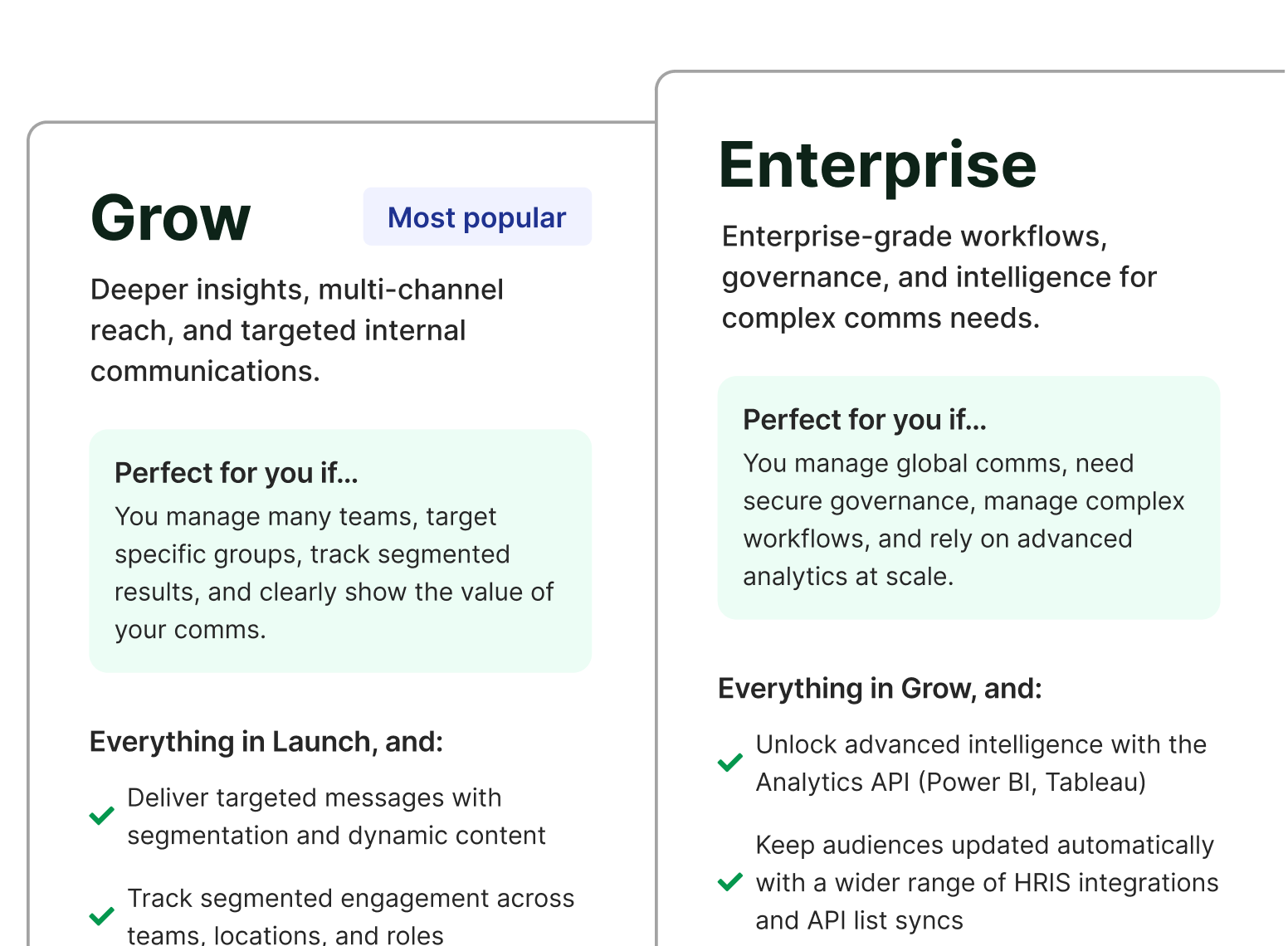
Teams doing a Staffbase vs PoliteMail evaluation are usually looking for a more comprehensive solution than a basic Outlook plugin. Staffbase is a well-known name in the enterprise communications space, and it can be a reasonable fit if your organization genuinely needs email, intranet, and a mobile employee app all under one roof. That said, email is not their core focus. Staffbase originated as Bananatag and has shifted its attention toward intranet and workplace apps, which means email has become a secondary product rather than something the platform actively invests in.
For teams where email is the priority, that shows up in a few important ways. Analytics can be unreliable, with inflated open rates that are hard to trust. The Outlook add-in is being sunsetted, which means teams that rely on it will eventually be pushed to a web-only workflow. And pricing, which typically runs $20K to $60K annually, often increases significantly at renewal.
Pros
- Strong employee app and intranet capabilities
- Good fit for large organizations with frontline or deskless workers who need a mobile-first experience
- Established enterprise platform with broad channel coverage
Cons
- Outlook add-in is being sunsetted, moving teams to a web-only workflow
- Analytics can be inaccurate and difficult to customize
- Email is a secondary focus, not the core product
- Renewal pricing increases have been reported as significant
- No dynamic content, no live link editing, no ConfidenceCheck
| Capability | ContactMonkey | Staffbase |
| Primary focus | Internal email, purpose-built | Intranet, employee app, email as a module |
| Outlook workflow | Fully native, full functionality in Outlook | Web app recommended for full feature access |
| AI pre-send quality review | ConfidenceCheck catches broken links, placeholder text, and date errors | Not available |
| Analytics | Segmented by department, location, HR attribute, all included | Analytics available, advanced reporting tied to plan tier |
| Dedicated CSM | Named CSM in your timezone, no ticket caps | Varies by plan |
| Implementation | 1 to 2 weeks | Reported at 25 weeks or more |
Bottom line: In a Staffbase vs Poppulo decision, neither platform puts internal email first, and if that is your primary channel, you will likely end up paying for more platform than you need while getting less on the email side than you deserve.
3. Workshop
Workshop is a newer player in the internal communications space, founded in 2020, and they have built a clean, easy-to-use platform that appeals to teams who want simplicity. They have a growing feature set, a Canva integration, and an AI assistant that’s chat-based and programmed with internal comms best practices. For teams with straightforward needs, it is worth knowing about.
That said, Workshop is web-based only, which is a meaningful limitation for organizations that run on Microsoft 365. There is no Outlook plugin, which means your distribution lists need to be rebuilt from scratch and emails do not send through your own infrastructure. Analytics are more limited compared to what IC teams typically need to report back to leadership, and as a newer platform, Workshop has less of a proven track record at scale. Renewal pricing is also worth scrutinizing carefully, as buyers have reported significant increases after the first year.
Pros
- Clean, modern interface that is easy to pick up quickly
- Canva integration built into the builder
- Cross-posting to Slack, Teams, and SharePoint
- AI assistant for drafting,rewriting content, and analyzing post-send performance
Cons
- Web-based only with no Outlook integration
- Analytics are more limited and less customizable
- Newer platform with less proven enterprise scalability
- Renewal pricing increases have been reported after year one
- Only offers 6 HRIS integrations
- No pre-send insurance, no visibility into your messaging blind spots, no dynamic content at the same depth
- Shorter track record and smaller customer success model compared to more established platforms
| Capability | ContactMonkey | Workshop |
| AI pre-send quality review | ConfidenceCheck catches broken links, placeholder text, and date errors | Not available |
| AI email builder | CoAuthor generates first drafts from a conversational brief inside Outlook and Gmail workflow | AI assistant for drafting and rewriting, chat-based |
| Outlook workflow | Fully native, sends through your own email tenant | Integrates with Outlook but does not send through your own tenant |
| Dynamic content | Up to 10 segments per content block | More limited segmentation depth |
| Analytics | Segmented by department, location, or HR attribute, all included | Core analytics available, less customizable for leadership reporting |
| HRIS integrations | 80+ providers including Workday, ADP, UKG, and Azure AD | 6 providers |
| Dedicated CSM | Named CSM in your timezone, no ticket caps | More limited customer success model |
| Platform maturity | 15+ years, Fortune 500 customers, 92-95 percent retention | Founded 2020, growing customer base |
Bottom line: Workshop can work well for smaller teams with basic needs and a straightforward sending workflow. For organizations that rely on Outlook, need deep analytics, or are scaling their internal communications program, the limitations start to show quickly.
4. PoliteMail
When teams do a Poppulo vs PoliteMail comparison, the contrast is striking — one is an enterprise suite, the other a legacy Outlook plugin. PoliteMail was one of the first internal communications tools on the market and built a solid following among Microsoft-heavy organizations looking for a simple way to track email engagement inside Outlook. For teams with very basic needs, it covers the core send and measure use cases.
The challenge is that the platform has not kept pace with where internal communications is heading. PoliteMail runs on an outdated COM plugin architecture that relies on the local machine for sending rather than the cloud, which is why users commonly report Outlook crashes, slowdowns, and lost work. Updates require IT involvement, support is reportedly capped at around 15 tickets per year, and the builder often requires manual HTML fixes to get emails looking right.
Pros
- Outlook-based sending familiar to Microsoft-heavy teams
- Covers basic internal email analytics for simple use cases
- Lower upfront price point
Cons
- Outdated COM plugin technology that Microsoft is moving away from
- Outlook crashes and performance issues commonly reported by users
- Builder requires HTML knowledge and fixes more often than it should
- Support is reportedly limited and slow to respond
- No AI features, no dynamic content, no embedded surveys
- IT involvement needed for updates and troubleshooting
Bottom line: PoliteMail made sense a decade ago when there were fewer options. Today, the technology is showing its age and the gap between what it offers and what IC teams actually need has grown considerably. If PoliteMail pricing seems like the primary draw, it is worth having a broader conversation about the total cost of lost time, IT overhead, and platform unreliability before making a decision.
| Capability | ContactMonkey | PoliteMail |
| AI pre-send quality review | ConfidenceCheck catches broken links, placeholder text, and date errors | Not available |
| AI email builder | CoAuthor generates first drafts from a prompt | No native AI writing tools built into the platform |
| Outlook architecture | Modern cloud-based Microsoft Store add-in, no local machine dependency | Plugin-based, Classic Outlook crashes and slowdowns reported by users |
| Email builder | Intuitive drag-and-drop, no HTML knowledge required | HTML fixes frequently required |
| Dynamic content | Up to 10 segments per content block | Basic merge fields and audience segmentation only, block-level dynamic content is not a core capability |
| Embedded employee surveys | Pulse checks, emoji reactions, and eNPS inside the email | Basic surveys only |
| Customer support | Named CSM, no ticket caps, unlimited support | Reportedly capped at around 15 tickets per year |
| HRIS integrations | 80+ providers | Limited |
Why Teams Switch from Poppulo to ContactMonkey
Internal communicators carry a specific kind of pressure that most people in an organization do not fully see. Every send comes with the quiet anxiety of not knowing whether the message actually landed, whether it reached the right people, or whether a mistake slipped through before anyone caught it.
ContactMonkey is built around solving exactly that. The right message reaching the right audience at the right time through the channel employees actually use. That is the standard we hold ourselves to, and it is what shapes every feature we build, from AI tools that help you create and quality-check content before it goes out, to analytics that tell you what is working and for whom, to an Outlook integration that meets employees where they already are.
Whether you are actively switching from Poppulo or just starting to explore other options, ContactMonkey is designed around the full internal email workflow. Every workflow traces back to the same goal and vision of giving internal communicators the confidence that their comms are actually working.
A drag-and-drop email template builder that doesn’t need code
Poppulo’s builder is one of the most common complaints we hear. Formatting breaks, bullets don’t align, and if you need to update a template, that means contacting support and often paying an additional fee. ContactMonkey’s drag-and-drop email template builder requires no design experience and gives your team full creative control from day one. You can create unlimited templates yourself, clone and customize them instantly, and make changes without involving anyone outside your team.

Outlook’s most advanced internal email integration
With ContactMonkey’s Outlook integration, Outlook becomes a fully equipped internal communications email software. ContactMonkey turns basic Outlook emails into branded, trackable, and engaging internal emails that employees are more likely to read and interact with. Images load properly, branding stays consistent, and teams can build polished HTML emails inside Outlook without coding or relying on external workflows. The integration also includes features internal comms teams use every day, including timezone sending, merge tag personalization, multimedia embeds, edit-after-send links, and detailed analytics tied to employee engagement.
Advanced internal email analytics to prove ROI to leadership
Poppulo’s analytics are widely described as limited and difficult to work with, and advanced reporting typically costs extra on top of your base contract. ContactMonkey analytics and reporting capabilities gives you real-time visibility into opens, click-through rates, read time, device breakdown, and location data as soon as your email lands. You can benchmark performance across departments, roles, and locations, build customizable dashboards that show leadership exactly what they need to see, and export presentation-ready reports in minutes. For teams that need to connect internal comms to business outcomes, ContactMonkey also integrates directly with Power BI and Tableau via the analytics API.
ContactMonkey users consistently achieve open rates of 76% and higher, and everything is included in your plan with no add-on fees. SEEK, for example, went from a costly, rigid platform that limited what their team could do, to hitting ANZ open rates of 55-60% and click rates averaging 19%, well above industry benchmarks, by using ContactMonkey’s segmented analytics to understand what was resonating with different employee groups and building their strategy around it. Read the full SEEK story
Embedded employee feedback direct inside the email
Getting employees to respond to surveys is hard enough without adding friction by sending them to an external form. ContactMonkey lets you embed pulse surveys, emoji reactions, and eNPS surveys directly inside the email, so employee feedback happens right in the moment. This is particularly valuable for reaching frontline and deskless workers who are harder to engage through traditional channels.

Dynamic content for more personalized, relevant emails
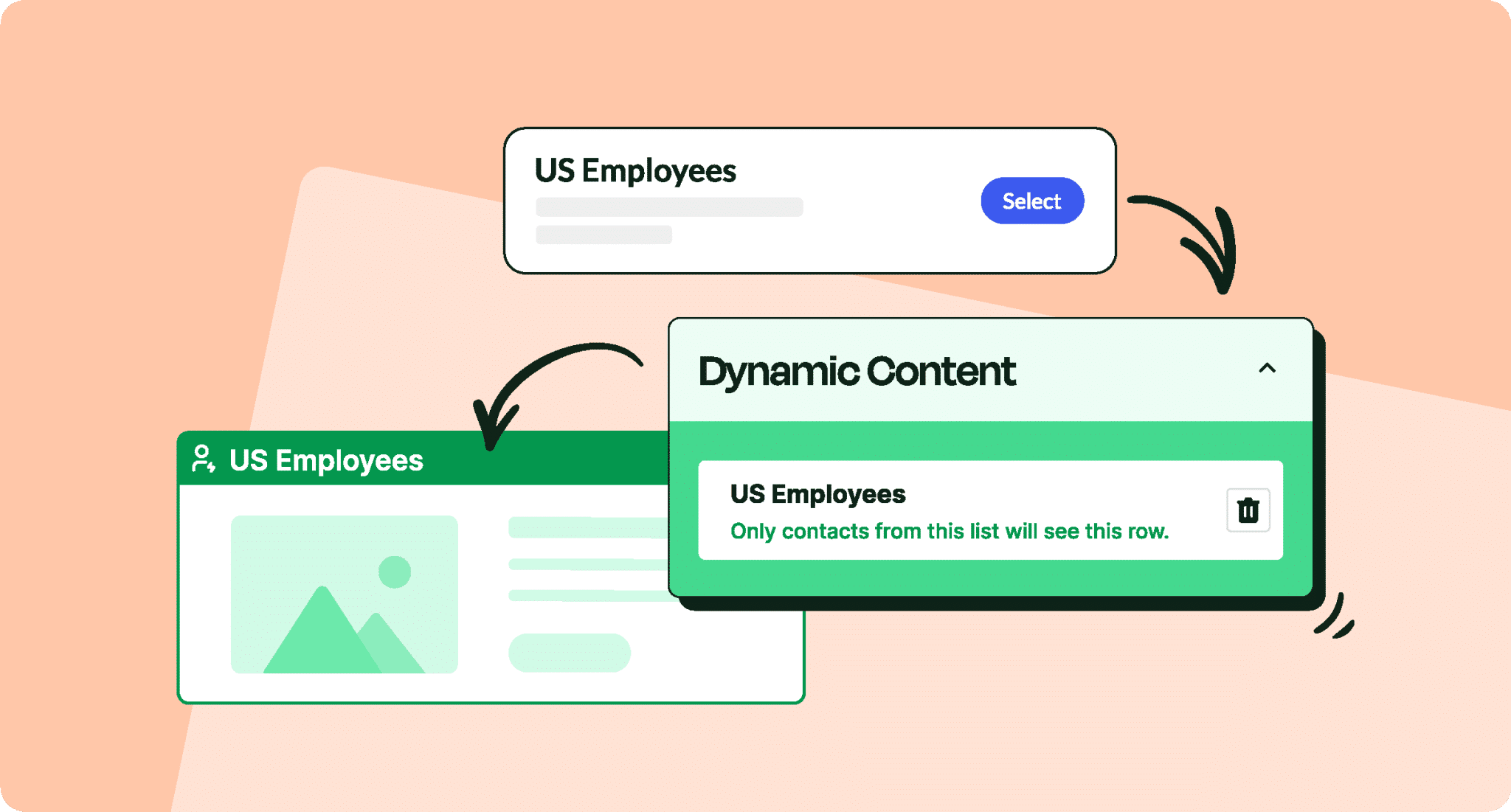
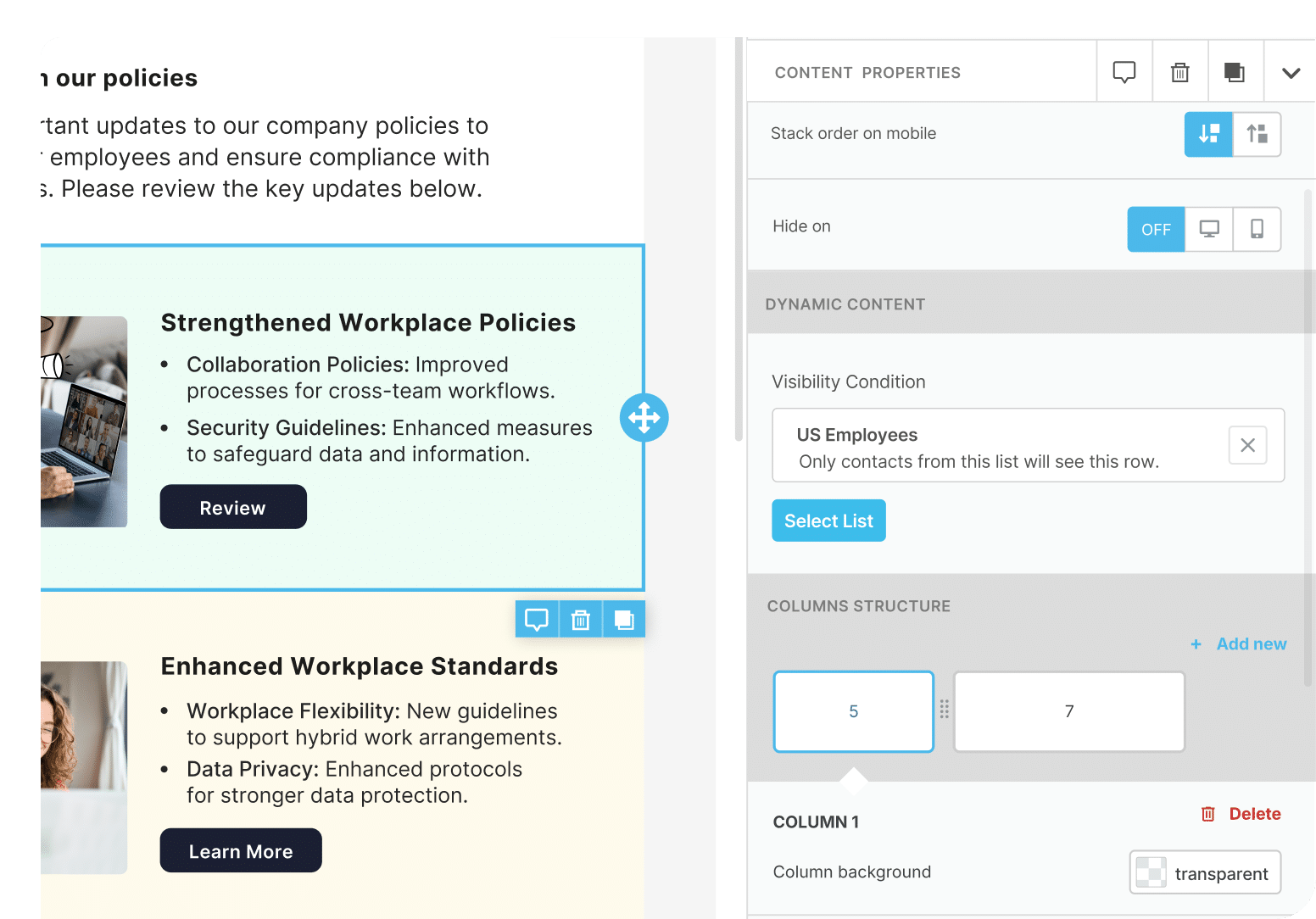
Dynamic content is one of ContactMonkey’s most popular features, and it solves a real problem that communicators run into constantly. Poppulo limits dynamic content to a single audience segment per content block, which means teams end up duplicating emails and manually managing multiple versions of the same send. ContactMonkey supports up to 10 segments per content block, so you can add conditional content blocks to any section of your newsletter and target by department, location, role, language, or any employee attribute.
Only want your frontline workers to see a specific section? Add a dynamic content block just for them. Have an update only relevant to the customer success team? Select them and no one else sees it. You send once and ContactMonkey automatically delivers the right content to the right people. You can also preview exactly what each audience group will see before the email goes out, and track employee engagement by segment afterward to understand what is resonating across different parts of your organization.
Take SEEK, a global employment marketplace operating across Australia, New Zealand, and Asia. Their team had a clear vision for more dynamic, brand-aligned communications but their old tool made it nearly impossible to adjust templates or target different employee groups without duplicating entire emails. After switching to ContactMonkey, people leaders now receive role-specific content tailored to their needs inside the main newsletter, no separate send required. Employees who had historically preferred Slack for important updates started gravitating toward email instead, a shift the team attributes directly to communications that finally felt relevant and well-designed.
As their Internal Communications Specialist Emily-Rose Carr put it: “We’ve been able to deliver content in a way that feels timely, easy to find, and highly relevant, something we couldn’t do before.” Read the full story

Support that understands internal communications workflows
Poppulo’s support team is based in Ireland, which means limited timezone coverage for teams in North America, Australia, and beyond. Response times are slow, and customers have reported issues going unresolved for extended periods. With ContactMonkey, every customer gets a named customer success manager in their timezone, unlimited support with no ticket caps, and quarterly business reviews to make sure your program is performing the way it should.
ContactMonkey, the Poppulo Alternative That Puts Internal Email First
Poppulo is a broad platform built to do a lot of things across a lot of channels. For some organizations, that breadth makes sense. But for internal communicators whose primary job is to reach, engage, and get a response from employees through email, a platform that treats email as one of many channels will always have its limits.
The internal communicators we talk to every day want a platform that makes it easier to build beautiful emails without fighting the builder and to understand how employees are actually engaging with their content, They want support that responds the same day, pricing that does not grow in ways they did not anticipate, and AI that genuinely helps them work more efficiently.
ContactMonkey is much more focused on the internal email workflow itself, which is one of the main reasons teams start comparing it against Poppulo. For organizations where employees mainly receive updates through email, the experience starts to matter a lot more.
If you are evaluating Poppulo alternatives and want to see what internal email looks like when the platform is built around the way your team actually works, book a demo and see the difference firsthand.
FAQ
What are the best Poppulo alternatives for internal communications teams?
The top Poppulo alternatives for internal communications teams are ContactMonkey, Staffbase, Workshop, and PoliteMail. Teams doing a Poppulo vs Staffbase comparison will find both take a broad omnichannel approach, while ContactMonkey is purpose-built for internal email. ContactMonkey is the strongest option for teams where internal email is the primary channel, offering native Outlook integration, deeper analytics, AI built into the workflow, and more responsive customer support at a lower price point than Poppulo.
Why do teams look for Poppulo alternatives?
The most common reasons internal communicators look for Poppulo alternatives include a clunky email builder that requires support tickets for template changes, slow customer support based in Ireland, image rendering issues that force employees to right-click and download images, limited analytics that cost extra to unlock, and a per-license pricing model that grows expensive over time.
Is ContactMonkey a good Poppulo alternative?
Yes, ContactMonkey is widely considered the best Poppulo alternative for organizations where internal email is the primary communications channel. It offers a more intuitive builder, native Outlook integration, AI-powered features like ConfidenceCheck and Audience Preview, deeper analytics included in the base plan, and a dedicated customer success manager in your timezone.
Can you switch from Poppulo to ContactMonkey easily?
Yes, ContactMonkey’s implementation typically takes one to two weeks from IT approval to go-live, compared to Poppulo which can take months to implement. Most organizations run a 60-day overlap period to ensure a smooth transition, and ContactMonkey’s team handles onboarding, template migration, and training throughout.
What should I look for when evaluating Poppulo alternatives?
When evaluating Poppulo alternatives, the key things to assess are whether the tool integrates natively with Outlook, how deep the analytics are and whether they are included in the base price, what AI capabilities are built into the day-to-day workflow, whether you can create and update templates without involving support, what the customer success model looks like, and what the total cost including all features actually is.