As an internal communications pro with experience supporting small-to-mid-sized teams, I know how it feels to be wrapped up in the tactical execution of the work, to the point where you lose sight of and time for strategic development. I also know what it feels like to be part of an understaffed (and even solo) IC team, often with little to no budget. I’ve worked in environments that treaded the line between having foundational internal communications practices in place and preparing to take the next step by investing in a designated internal communications platform.
This next step — investing in an internal communications platform — is the inflection point at which organizations truly transform their internal comms practices into strategic business functions. The right tool can dramatically reduce manual work, unlock meaningful analytics, and create intentional space for strategic planning.
In this review, I’ll look at ContactMonkey from an internal communicator’s perspective: where it stands out, where it falls short, and which types of teams are most likely to benefit. My goal is to give you a clear, practical view of how ContactMonkey actually solves real internal comms workflow challenges, especially if you’re a solo IC or part of a small, stretched-thin team.
The Reality of Internal Communications Today
Internal communication is undergoing one of its most significant shifts in decades. Internal communication teams are contending with rapid technological change, distributed workforces, and growing expectations from both employees and executives. External volatility is additionally pressuring organizations to communicate quickly and clearly.
In short, expectations are growing, and communication volume is high. At the same time, research shows that internal communications teams are understaffed, often comprising a small handful of team members, or even a solo internal communicator. ContactMonkey’s Global State of Internal Communications (GSIC) Report 2026 suggests nearly 1 in 5 internal communicators operate as a single-person team, while 10% of organizations don’t have an internal communications team at all, grouping responsibilities under other role titles.
Gallagher’s 2026 Employee Communications Report tells a similar story. Limited capacity is a monumental challenge: 69% of organizations have fewer than six people in a communications role, whether they support 500 or 50,000 employees. And 1 in 3 have no dedicated communications budget, limiting investment in internal comms tools, training, and, importantly, measurement. Without these investments, internal communicators typically have to push the same messages to their entire audience (no segmentation) and have no, or ineffective, ways of gauging whether their efforts actually work.
Reaching frontline employees adds additional layers of complexity. According to the same Gallagher data, organizations with a primarily frontline workforce are 1.3x as likely to perceive a higher risk of not achieving their communication goals. It’s not as easy as pushing messaging through an array of digital channels to reach frontline employees.
The reality is that a simple shift to the right internal communications software can help address most of these challenges, empowering solo and small teams to show up as the strategic drivers of business outcomes and culture they strive to be.
What is ContactMonkey?
ContactMonkey is an internal communications platform built directly inside your existing workflow in Outlook and Gmail. It gives IC teams the tools to design polished employee emails and newsletters, target the right employees through audience segmentation, collect real-time feedback through embedded surveys, and track engagement through analytics that show who opened, clicked, read, and responded. With actual engagement data tied to every send, internal communicators can turn employee feedback into a concrete internal communications strategy rather than relying on guesswork.
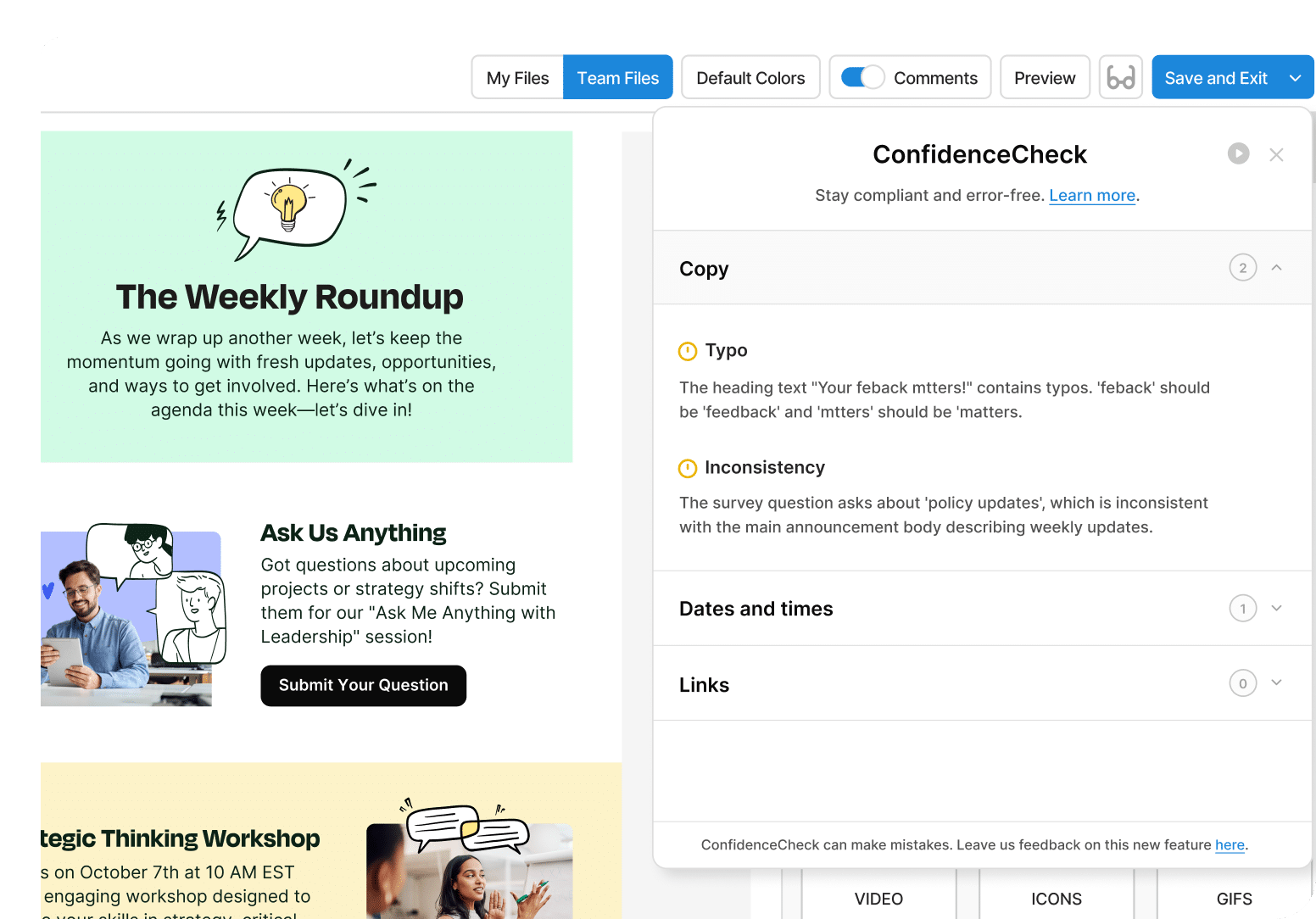
Where most internal email tools stop at delivery, ContactMonkey is designed to close the loop. The platform’s AI capabilities help communicators build and review emails faster, while its analytics infrastructure gives teams the data they need to demonstrate impact, refine strategy, and make the case for internal communications as a strategic business function. It is also the only platform in the category with a native pre-send quality layer: ConfidenceCheck reviews every email for WCAG 2.1 AA accessibility compliance, brand consistency, grammar, and custom organizational rules before anything reaches an employee’s inbox. For solo internal communicators and small teams supporting large or distributed workforces, that combination of speed, insight, and built-in protection is the difference between managing communications reactively and leading them with intention.

What ContactMonkey Actually Helps With (From an Internal Communicator’s Perspective)
Internal comms software worth advocating for should achieve three things:
- It should improve and shorten your workflows.
- It should give you valuable data points to inform your decision-making.
- It should help you position yourself as a strategic business partner with senior executives.
ContactMonkey does all three. Here’s a look at what my previous internal communications workflows without designated internal email software looked like, and how ContactMonkey would have helped.
Internal email creation that doesn’t slow you down
No matter where you work, internal email is likely part of your internal communications strategy in some form or another. And as many internal communicators know, the internal email process, from discussing messaging to drafting and formatting to pressing send, can be time-consuming without the right workflows and employee communication tools to support it.
When I worked at an organization that used Microsoft Outlook and didn’t have an internal communications tool, my workflow almost always looked like this:
- Search my inbox for previous versions of similar emails for reference
- Copy and paste a previous email (if I could find one) into a new email draft
- Clear past details (and hope I didn’t miss any)
- Add or draft new copy
- Send copy to designated reviewers for approval
- Search for or create images to add to emails
- Double-check links, bold important information, and complete any additional formatting steps
- Send the internal email and move on
Similarly, I worked at an organization that used Gmail and followed a similar, albeit slightly longer, process:
- Search Gmail or Google Docs for previous versions of similar emails (or open a Google Doc with previous drafts if I knew we stored them in a document)
- Copy and paste a previous email (if I could find one) into a new email draft or into Google Docs
- Clear past details (and hope I didn’t miss any)
- Add or draft new copy
- Send copy to designated reviewers for approval
- Search for or create images to add to emails
- Double-check links, bold important information, and complete any additional formatting steps
- Paste the email draft from Google Docs into Gmail
- Adjust formatting one last time to account for transfer issues
- Send the internal email and move on
Clunky processes like these slow internal communicators down. Building internal emails in tools outside your email client (like writing them in Google Docs for collaboration and then pasting them into Gmail) is inefficient and daunting, adding complexity where simplification works best.
How ContactMonkey improves internal email creation
Using ContactMonkey and building internal emails directly inside Outlook would have significantly decreased my email creation time. My workflow would have looked more like:
- Open the CM platform, select one of my previous email templates, use the drag-and-drop template builder to quickly put one together, or use the AI Email Builder to turn content ideas into an intelligently laid-out email template. Then, open Outlook, pull in the pre-designed email, and send from there
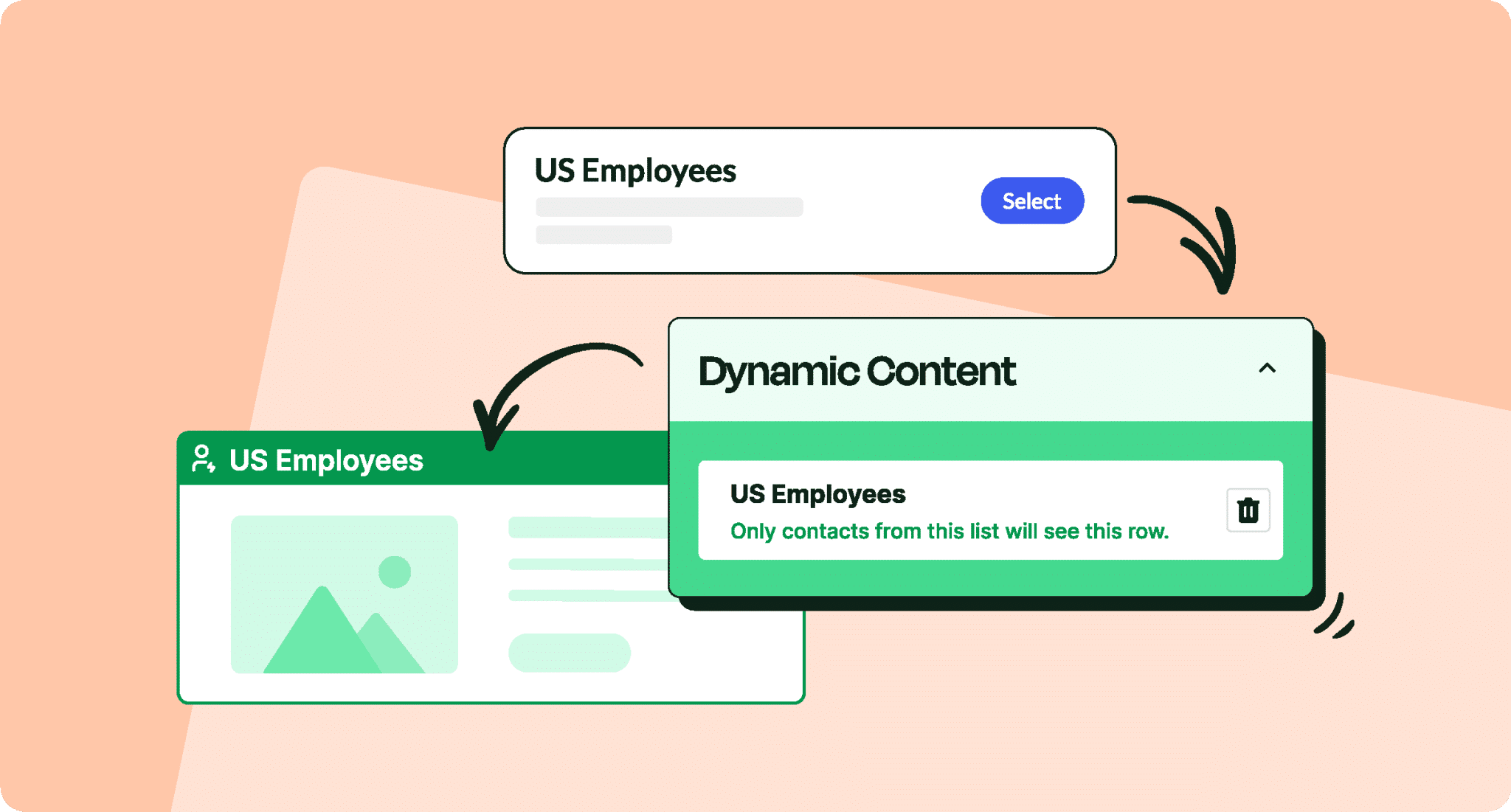
- Use dynamic content blocks to create one email with tailored content blocks for different audiences
- Add the email copy, images, and visuals (saved in the library if previously used), plus survey and feedback questions as needed
- Use AI ConfidenceCheck to flag broken links, content inconsistencies, readability concerns, and other issues
- Send the internal email and monitor analytics
James Maiden, Internal Communications Specialist and ContactMonkey user, finds dynamic content capabilities particularly valuable for time savings that eliminate copy and pasting: “With dynamic content, I can build one email with multiple blocks, with each block tailored to the right group. I’m not duplicating emails or copy/pasting. It saves time and reduces mistakes.”
Email creation shouldn’t slow internal communicators down, nor should it feel like a manual process you have to start from scratch for each new draft.
Engagement analytics that actually show how employees interact with your email and newsletter content
From an internal communicator’s perspective, you need to understand how messages land with employees. You can experiment with internal communications tactics endlessly, but you may never actually improve without the feedback of the people who matter most.
Without meaningful analytics, internal email turns into a “send and hope for the best” exercise. You hit send, move on to the next request, and maybe hear a few offhand comments or see a small handful of replies. That’s not enough to refine your strategy, prove impact, or confidently advise leaders.
In my previous roles, analytics were either non-existent or stitched together from multiple tools, resulting in a lot of guesswork and very little data-driven decision-making. Here’s what that looked like in reality, and how ContactMonkey would have helped.
Microsoft Outlook workflow (no measurement, all guesswork):
- We didn’t track internal email performance at all. Once we sent an email, that was the end of the story.
- The only signals we had came from email replies, informal feedback in meetings, or hallway chats.
- There was no way to tell whether content, subject lines, or send times were effective.
- Internal communication became more of a checkbox exercise than a strategic function.
Gmail workflow (patchwork analytics with a high time cost):
- When our graphic designer left, our beautifully formatted Adobe InDesign newsletter went with them, as my organization didn’t initially plan to backfill the role.
- I saw two options: learn Adobe InDesign or reinvent the process. I chose the latter.
- I rebuilt our newsletter in Canva and exported it as a PDF to attach to Gmail.
- To get even a sliver of insight, I used Bitly links inside the PDF to track clicks.
- Every issue required:
- Designing and editing in Canva
- Downloading and attaching the PDF
- Creating and managing Bitly links for key CTAs
- Manually checking Bitly to see if anyone was clicking
It was extremely time-consuming, and during busy weeks, the tracking step was the first to get dropped. Even when we did collect data, it was limited to link clicks with no visibility into who opened the email, which sections they cared about, or how content performed over time.
In both scenarios, there was no simple, reliable way to answer basic questions like:
- Are employees opening our emails?
- Which content resonates most?
- Are different segments (leaders, people managers, frontline teams) engaging differently?
- Did that message actually reach the right people?
How ContactMonkey improves internal comms measurement
With ContactMonkey integrated directly into Outlook, I could have:
- Tracked key engagement metrics in the same place I sent the email automatically, including:
- Open rates
- Click-through rates on specific links or buttons
- Sections employees scroll to and engage with the most
- Device usage (desktop vs. mobile)
- Compared performance over time to see how recurring emails (like weekly newsletters or leadership updates) performed over time
- Segmented analytics by audience (leaders, managers, departments, locations, etc.) to understand who was engaging and who needed more support or tailored messaging.
- Tested and iterated on:
- Send times
- Layout and content hierarchy
- CTAs and messaging angles
Instead of cobbling together insights from replies, hearsay, and one-off link tracking, I would have had a consistent source of truth that would allow me to:
- Walk into executive meetings with concrete numbers, not gut feelings alone.
- Show which communications employees actually read and acted on.
- Identify under-served groups (for example, a region or team with consistently low engagement).
- Confidently recommend changes to channel strategy, content mix, or cadence based on employee behavior, not assumptions.
Analytics shouldn’t be an afterthought or a nice-to-have. They’re what transform internal communication from a reactive service function to a strategic partner.
That’s true of Toni Daylor’s, Director of Global Internal Communications experience with ContactMonkey: “I rely very heavily on the analytics because it shows me what’s working, what’s not working, what content resonates and does not, and how I can massage it or find a different channel or whatever I need to do to make it more engaging so that they are doing the hundred percent click-opens. It’s also very helpful where it shows me the different links that are being clicked on. That’s super helpful to me.”

Built-in feedback tools and pulse surveys for two-way conversations so IC understands where to focus
Sending messages is only half the job. The other half is understanding what employees actually think, where they’re confused, and what they need more of. That’s where pulse surveys and feedback channels should help. In my experience, they often sit outside of IC’s control.
At one organization, to gather feedback on our internal communications, I partnered with HR to add a few comms-focused questions to existing pulse surveys in Lattice, which they then pushed to employees via Slack. On paper, it sounded like a good way to piggyback on an existing process. In reality, it looked more like this:
- I had no control over the pulse survey setup as HR owned the tool, the questions, and the cadence.
- Questions were randomized and scheduled, not linked to specific campaigns or messages.
- Communication-related questions would reach employees at various times, sometimes weeks after a key announcement or change.
- When I wanted to see the results, I had to request reports from HR and wait until they had time to pull and share them.
Sometimes the feedback was helpful directionally; other times it felt irrelevant or too delayed to act on. When I wanted to adjust our internal communications approach — try a different channel, simplify messaging, or change cadence — I didn’t have timely, targeted data to support those decisions. I was mostly relying on:
- Informal feedback mechanisms, including 1:1 conversations with peers
- Anecdotes from managers
- One-off comments in meetings
- Best guesses about what might be working based on observations
How ContactMonkey improves internal comms through feedback loops
With ContactMonkey, feedback and pulse surveys become part of the communication itself, not a separate HR-owned process that may or may not align with your messages.
Instead of relying on surveys outside my control, I could have:
- Embedded quick pulse questions directly into key emails and internal newsletters.
- Collected feedback at the exact moment employees were engaging with a message, instead of weeks later via a generic survey.
- Tied responses back to specific sends, topics, or audiences, so I’d know which messages were landing well and which weren’t.
- Viewed pulse survey results in the same place as email analytics, giving me a full picture of both what employees did (opens, clicks) and how they felt (feedback, sentiment).
Having that level of control and context would have fundamentally changed how I approached internal communications. By bringing surveys and feedback directly into your internal emails, ContactMonkey turns one-way messages into two-way conversations. You’re actively listening, learning, and adjusting in real time.
ContactMonkey user, Lindsey Champagne, Director of Communications and PR, agrees: “We have truly just scratched the surface of what is possible with ContactMonkey. But overall, being able to include surveys to recruit feedback, track link clicks, and time spent on our emails has helped inform how to improve our strategy.”
For solo and small internal comms teams, especially, that shift is critical. Built-in feedback helps you show up as a strategic partner who understands how internal communications are and aren’t working for ongoing iteration.
Targeting the right employees, because not every communication is relevant to everyone
In my experience, targeting was one of the most fragile parts of the internal comms process: easy to get wrong, hard to diagnose, and rarely owned by IC.
Most internal email strategies I’ve worked with relied on one of two defaults:
- Send to all staff. When in doubt, send everything to everyone. It feels “safer,” but it floods inboxes with messages that aren’t relevant to every employee.
- Use IT-managed distribution lists. For more targeted messages, I’d receive the name of a distribution list (for example, executives, people managers, or a specific department or region) and trust that it was accurate and up to date. (Or occasionally, worse, enter a list of email addresses manually.)
In practice, that led to recurring issues. Most commonly, key recipients didn’t receive critical communications because distribution lists were inaccurate. When something went wrong, it wasn’t clear where the breakdown happened: in communications, HR, IT, or somewhere in between.
How ContactMonkey helps internal comms reach the right audience (at the right time)
With ContactMonkey, I could have:
- Segmented audiences based on real employee attributes such as department, role, location, manager status, or custom fields.
- Sent targeted communications to specific groups (for example, people managers, leaders, frontline teams, or a single region) without needing separate, manually maintained lists.
- Reduced the risk of misdirected emails by relying on active employment data in the HRIS instead of outdated or incomplete lists.
Segmentation only works if the underlying data is trustworthy. Your HRIS still needs to be accurate, but in most organizations, what’s more likely to be accurate — your HRIS with active employment information or your IT-managed distribution lists?
When IC teams don’t control or trust targeting, they’re forced into one of two corners: over-communicate to everyone or under-communicate and hope critical messages land where they should.
Smarter targeting and segmentation help internal communicators protect employees’ attention, build credibility through accuracy, and experiment with different approaches for different audiences.
Built-in AI-powered internal comms support
Years ago, as an in-house internal communicator, AI tools didn’t exist. I spent much of my time wordsmithing, second-guessing phrasing, and rereading messages to make sure they were clear, consistent, and on-brand. For solo ICers and small teams, that kind of deep editing time usually competes with everything else on your plate, including leadership requests, last-minute announcements, channel management, and reporting.
Today’s internal communicators have an advantage: built-in AI that supports work behind the scenes.
How ContactMonkey helps internal comms pros save time with AI
With ContactMonkey, AI shows up as a helpful layer on top of existing workflows rather than a separate employee communications tool to manage. Two features do most of the heavy lifting: CoAuthor (the AI Email Builder) and ConfidenceCheck.
CoAuthor is an AI draft and design agent that lives directly inside ContactMonkey’s drag-and-drop email builder. You simply describe the email you want, including the topic, the audience, and the tone, and CoAuthor generates a complete, structured email with a subject line, body copy, and logical layout, ready for your review. Whether you’re sending an all-hands update or a policy change notice, it eliminates the blank-page problem and designs a strong first draft in seconds. The goal, as ContactMonkey puts it, is to get you to a first draft faster so you can focus your energy where it matters most.
ConfidenceCheck handles the other end of the process. Before you send, it reviews your email for broken links, readability issues, content inconsistencies, and accessibility concerns, acting as an extra set of eyes when you don’t have a teammate available to proofread (or even when you do, knowing that tired eyes can miss errors despite editorial reviews). For solo internal communicators, this matters more than it sounds. ConfidenceCheck eliminates pre-send anxiety by catching common mistakes that are easy to miss when you’re the only set of eyes on an email before it goes out to hundreds or thousands of employees. It was also recently enhanced with Custom Check, which allows organizations to tailor rules to their unique standards.
For solo ICers and lean teams, AI can take on some of the repetitive, time-consuming parts of writing and reviewing so you don’t have to do everything manually. That time and headspace can shift toward higher-value work: aligning with stakeholders, sharpening narratives as you build campaigns, and ensuring each message supports your business strategy.
In other words, AI becomes the partner you wish you had on your team, helping you move faster without sacrificing quality.

Where ContactMonkey Isn’t Perfect
As much as ContactMonkey solves many everyday internal comms workflow pain points, it’s not a silver bullet, and it’s not the right fit for every team or use case. Like every internal comms platform, it has limitations that are important to understand before you build it into your strategy. Here are a few areas where ContactMonkey may not fully meet your needs:
Not designed to replace an intranet / not a standalone intranet platform
ContactMonkey makes email-based internal communications easier, smarter, and more measurable, but it isn’t currently designed to be a single source of truth for all company information. If your organization needs a centralized space where employees can search policies, access documents, and collaborate asynchronously, you’ll still need an intranet or knowledge hub. ContactMonkey can complement those platforms by driving traffic and engagement through internal email, but it can’t fill this need on its own. Teams looking for an “all-in-one” comms and content repository may find this limiting. However, take a look at where ContactMonkey is building towards here.
Best used alongside advanced analytics platforms for impact measurement
ContactMonkey’s employee engagement analytics are strong at understanding how employees engage with your emails through opens, clicks, scrolls, audience-level patterns, and sentiment checks. Where it’s less comprehensive is in tying those behaviors directly to business or behavioral outcomes, like reduced support tickets, higher tool adoption, or improved safety metrics. To get that level of insight, teams typically need to connect ContactMonkey data with external analytics platforms such as Power BI or Tableau if understanding behavioral impact is critical for your team. Thanks to the Analytics API feature, this is possible today.
Strongest in email-first communication strategies
ContactMonkey excels in environments where email is a primary (or at least a major) internal communications channel. If your organization isn’t internal email-heavy, the platform’s strengths may feel less impactful. You can still use ContactMonkey to improve and measure the emails you send, but it might not feel as transformative if your focus is on other channels. For teams with minimal internal email, the return on investment may be harder to justify. You can still push your emails to SharePoint and Teams, though the primary channel is email. Plus, the recent Appspace integration allows you to pull intranet-like stories from Appspace into your email.
How ContactMonkey Compares to Traditional Email Tools
Traditional tools like Microsoft Outlook provide the basics for internal email, but they weren’t built for strategic, large-scale employee communication. The data Outlook provides is minimal. Read receipts or delivery confirmations can tell you whether an email reached someone’s inbox or whether a recipient chose to confirm they opened it, but they don’t offer the kind of audience-level analytics, segmentation, or feedback capabilities that internal communicators need to understand and improve their internal comms. Not only that, but Outlook can send 30 emails per minute, while ContactMonkey’s infrastructure allows you to send 75,000 emails per minute. ContactMonkey fills all these gaps, turning everyday email into a measurable channel with built-in employee engagement analytics, targeting, increased sending speeds, and engagement features designed specifically for internal comms.
On the other end of the spectrum, external email marketing platforms like Mailchimp and HubSpot are powerful for customer outreach, but they’re not designed for internal communication. They treat employees like customers who can opt out of critical updates, often lack the security posture needed for sensitive internal data, and focus more on broadcasting than on two-way dialogue with staff.
ContactMonkey offers a strategic middle ground: It lives inside the tools employees already use (Outlook and Gmail), respects the actualities of internal communication (no employee “unsubscribe” from essential internal comms), and adds capabilities tailored to internal audiences rather than external marketing campaigns.
Who ContactMonkey Works Best For
ContactMonkey delivers the most value for teams already using email as a core internal communications channel that want to move from “sending information” to effectively managing, measuring, and monitoring it. ContactMonkey often works best for:
- Internal comms teams using Outlook or Gmail: ContactMonkey is built to sit directly inside Outlook and Gmail, so teams can design, send, and measure internal emails without jumping between tools. If your IC function already runs through these email clients, ContactMonkey feels more like an upgrade to your existing workflow than a net-new platform to adopt.
- Organizations with large or distributed workforces: The more locations, roles, and time zones you’re communicating with, the harder it is to rely on generic all-staff emails. ContactMonkey helps distributed organizations segment audiences, tailor messages, and understand how different groups are engaging, so you can support people where they actually are.
- Enterprise organizations: Larger organizations tend to have higher message volume, more stakeholders, and more scrutiny on the impact of internal comms. ContactMonkey’s sending protection (ConfidenceCheck), analytics, targeting, and feedback features help enterprise IC teams move beyond basic sending and into data-informed planning, prioritization, and reporting.
- IC teams that want data-driven communication: If you’re ready to move past “send and hope for the best” and want to back your recommendations with data, ContactMonkey is a strong fit. It gives internal communicators the metrics and feedback they need to iterate, demonstrate impact, and hold a more strategic seat at the table.
ContactMonkey is possibly less necessary for:
- Very small organizations: If your company is small enough that you can handle most internal comms in person, via chat, or in a single weekly email, you may not feel the full benefit of a dedicated internal email platform. In those environments, the complexity and volume that ContactMonkey handles may not yet exist.
- Companies with minimal internal email comms: If your internal communication strategy is intentionally light on email and leans heavily on other channels, ContactMonkey’s strengths won’t be as central to your program. You can still improve and measure the emails you send, but other tools may be a higher-priority investment.
Is ContactMonkey Right for Your Team? Final Takeaways from an Internal Communicator
From an internal communicator’s perspective, ContactMonkey meaningfully improves the parts of the job that are often the most manual and least measurable: building emails, targeting the right employees, gathering feedback, and proving impact. By sitting directly inside Outlook and Gmail, it turns a familiar channel into something closer to a proper internal communications platform without asking already-stretched teams to adopt yet another standalone tool.
The trade-offs are important to understand. ContactMonkey doesn’t replace an intranet, and it won’t, by itself, measure business outcomes without additional data. It’s also most powerful in organizations where email is a primary internal channel, and there’s enough scale or operational maturity to benefit from segmentation, employee engagement analytics, and AI support.
If you’re a solo IC or part of a small, resource-strapped team supporting a larger or distributed workforce, ContactMonkey is a solid choice. It can help you move away from the “send and hope for the best” approach and toward a more intentional, data-informed practice. In the right environment, it can give you the workflows, insight, and confidence you need to operate more like a strategic partner and less like an order-taker.
If any of this sounds familiar, ContactMonkey is worth seeing firsthand. Book a demo and see how it fits your internal communication team’s workflow.