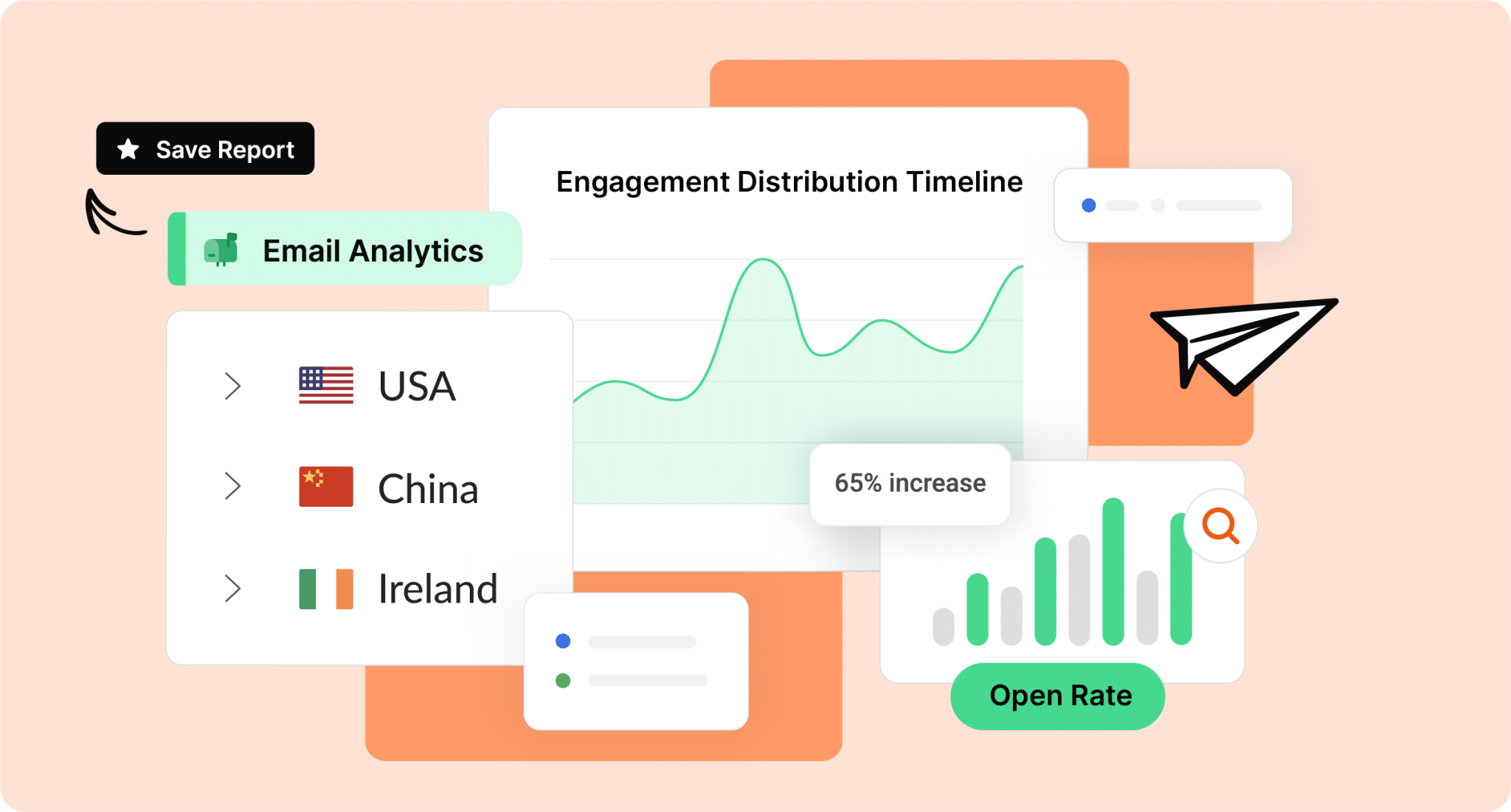
Looking for the best internal newsletter software in 2026? This article breaks down the top internal newsletter platforms, compares key features and tradeoffs, and helps IC professionals choose the right solution to improve reach, engagement, and measurement.
In an age of Slack pings, mobile alerts, and AI assistants, the internal email newsletter might seem old-school. Yet it remains the most reliable way to reach every employee, regardless of location, device, or role. According to ContactMonkey’s Global State of Internal Communications Report (GSIC) 2026, 67% of communicators identify email newsletters as one of the most valuable channels. This shows that they remain a core part of modern internal communications.
What has evolved is the technology behind them. Today’s internal newsletter platforms personalize content, automate delivery, track engagement in real time, and integrate directly into tools that teams already use, like Outlook and Gmail. With the right platform, internal newsletters become measurable, scalable, and far more engaging than basic company-wide sends. They give internal comms the same level of intelligence marketing teams have enjoyed for years.
The challenge for many IC teams is choosing the right software. Do you need deep analytics? AI-powered personalization? Better reach for global or frontline teams? We’ve done the research. Below is a data-backed comparison of the best internal newsletter software solutions for 2026, starting with the one that sets the standard: ContactMonkey.
The Modern Internal Newsletter: Still Your Most Powerful Channel
If you’re still relying on basic Outlook sends or repurposed marketing tools, here’s the bottom line: internal newsletter software is built for internal communicators who need to reach employees at scale and prove impact.
The truth is, Outlook, Gmail, and external marketing platforms were never designed for the realities of internal communication. Things like segmented employee audiences, leadership reporting, and two way feedback are hard to manage, and proving ROI is even harder. As a result, teams often end up juggling multiple tools just to get a single email campaign out the door.
Luckily, purpose-built employee newsletter platforms are designed to solve these exact challenges. They support personalization, engagement, and measurement in one place, and they’re actually built for internal communications, not just generic email sends. Below, we’ll break down why dedicated internal newsletter platforms consistently outperform basic email tools, and what that means for your strategy in 2026.
Key benefits of using internal newsletter software
The real value of internal newsletter software shows up in how it changes day-to-day work for internal communications teams. Below are the core benefits that separate dedicated platforms from basic email tools.
1. Centralized, scalable communication for lean IC teams
Internal communications teams are small, but expectations keep growing. GSIC shows that many internal comms teams are made up of just one to five people, even in large organizations. And yet, these teams are responsible for planning campaigns, building newsletters, coordinating approvals, and reporting results. When that work is spread across Outlook, shared documents, and other tools, efficiency quickly breaks down. This is where internal newsletter software starts to outperform basic email sends.
That fragmentation is common. 59% of internal communicators use three or more channels to distribute updates, which often leads to duplicated effort, inconsistent messaging, and extra manual work.
Purpose-built internal newsletter platform centralizes these workflows into one system. Planning, design, distribution, and measurement live in the same place, making it easier for small teams to operate at scale without complicating things.
Why it matters:
- Faster turnaround: Fewer tools and handoffs shorten approval cycles and speed up sends.
- Less duplication: Centralized templates and content reduce rebuilding the same newsletter across teams or regions.
- More consistency: One system helps ensure employees receive aligned messages, regardless of who sends them.
- Better use of time: Lean teams spend less time managing processes and more time improving communication quality.
2. Improved employee reach (email still wins)
With so many tools competing for attention, making sure employees actually see your messages is half the battle. Despite the rise of chat tools and intranets, email remains the most reliable way to reach employees at scale. But the challenge isn’t choosing email. Because we know that email still wins for employee reach. It’s delivering the right message to the right audience at the right moment.
Basic Outlook takes a one-size-fits-all all approach. Since it offers limited targeting, minimal personalization, and little control over delivery across timezones, important updates can easily get buried or arrive too late to matter.
This is where internal newsletter software makes a real difference. Purpose-built internal comms tools support audience segmentation by role, department, or location, without forcing teams to create multiple versions of the same email. Features like time-zone optimized newsletters help ensure messages arrive when employees are most likely to open them, no matter where they work. Modern employee newsletter platforms make it easier to personalize messages at scale. Dynamic content blocks and segmentation help ensure employees receive information that’s actually relevant to them.
Why it matters:
- Higher visibility: Targeted delivery increases the chances that employees actually see important updates.
- Less inbox fatigue: Relevant content reduces the need for broad company-wide blasts.
- Stronger engagement: Personalized, well-timed emails are more likely to be opened and acted on.
- Consistent reach: Email works across desk-based, frontline, remote, and global teams.
3. Analytics that finally prove internal newsletter ROI
For many internal communicators, measurement is still the hardest part of the job.
GSIC 2026 found that more than 40% of IC professionals identify analytics as their most valuable capability in internal communications tools. Not because metrics are nice to have, but because leadership increasingly expects proof that internal newsletters are driving engagement, alignment, and action.
This is where basic tools fall short.
Outlook and Gmail focus on sending messages, not measuring their impact. External marketing platforms may provide high-level email stats, but they’re not designed for internal use cases like employee engagement, leadership updates, or change communications. As a result, teams often rely on assumptions, anecdotal feedback, or manual reporting to explain performance.
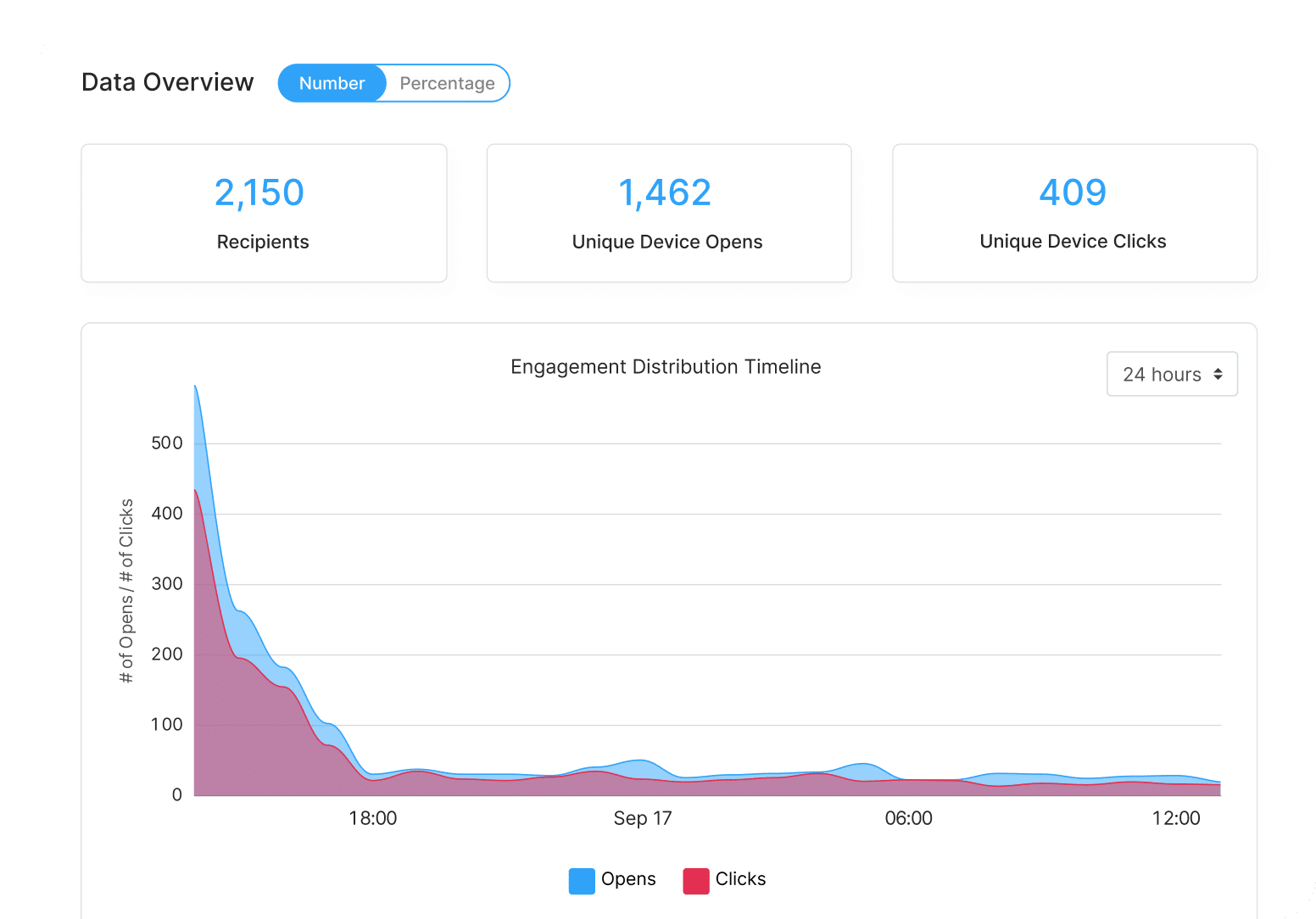
With built-in internal newsletter analytics, communicators can see how employees actually engage with content, not just whether an email was sent. Open rates, click behavior, read time, and engagement by audience segment are all visible in one place, without having to export any data. This level of insight makes it easier to move from activity-based reporting to outcomes. Instead of saying an email went out, teams can actually show how different audiences responded, which content drove action, and where engagement dropped off. So proving ROI becomes part of the workflow, not just an afterthought. Over time, this data becomes the foundation for a more intentional employee newsletter strategy, grounded in evidence rather than guesswork.
Why it matters:
- Clear proof of value: Engagement data helps demonstrate the impact of internal newsletters to leaders and stakeholders.
- Better decisions: Performance trends reveal what content, timing, and formats resonate most with employees.
- Continuous improvement: Campaigns can be refined using real data, not assumptions.
- Stronger credibility: Analytics support more confident conversations around internal email ROI and investment.

4. Personalized, data-driven experiences
Email personalization isn’t just a marketing tactic. For IC, it’s one of the strongest drivers of attention and engagement.
The challenge is scale. Internal communicators are often asked to reach global, diverse employee audiences with messages that still feel relevant at the individual level. When teams rely on basic Outlook sends, personalization usually stops at “send to all” or, at best, a few static distribution lists. The result is broad messaging that employees skim, ignore, or simply assume doesn’t apply to them.
The impact of that gap is measurable. ContactMonkey’s Internal Email Benchmark Report found that personalized newsletters achieve 34% higher open rates compared to generic sends. That difference reflects a simple truth: employees are more likely to engage when content feels clearly meant for them.
Internal newsletter software makes this level of personalization practical. Tools with dynamic content blocks, audience segmentation, and AI-powered targeting allow teams to tailor messages by role, department, or location without creating multiple versions of the same email. A single newsletter can serve different audiences while still being managed as one campaign, even in large, global organizations. More importantly, engagement data reveals what actually resonates with different groups, so newsletters improve over time instead of staying static.
Why it matters:
- Higher engagement: Personalized newsletters consistently drive stronger open and click rates.
- More relevance: Employees see content that applies to their role, team, or location.
- Smarter decisions: Engagement data reveals what resonates with different audiences.
- Scalable personalization: Teams tailor content without multiplying workload or complexity.
5. Increased efficiency through AI-powered capabilities
AI is no longer experimental in internal communications. It’s already part of how teams work.
According to GSIC 2026, AI is moving to the center of the stage in internal comms, with 57% of respondents citing AI as a top area of interest as teams look to scale content creation, personalization, and analysis more efficiently. For IC teams under constant pressure to deliver more with limited time, AI isn’t about replacing strategy. It’s about removing friction from execution.
That friction shows up quickly in traditional email workflows. In Outlook or Gmail, every newsletter starts from scratch. Subject lines are written manually. Content is copied and pasted. Personalization often means creating multiple versions of the same email, if it happens at all. As organizations grow or become more distributed, this approach becomes difficult to sustain.
Internal newsletter platforms with AI-driven capabilities help reduce that manual overhead. AI can support subject line suggestions, layout recommendations, content tagging, and language refinement, helping communicators move from draft to send more efficiently. It also helps ensure newsletters are polished, consistent, and ready to send with confidence.
The impact on time is significant. GSIC shows that 64% of teams using AI for newsletter creation report saving 25–50% of their time, freeing up capacity for higher-value work like refining messaging, improving targeting, and planning future campaigns.
Why it matters:
- Faster production: AI reduces time spent drafting, formatting, and editing newsletters.
- Higher quality: Built-in suggestions help catch errors and improve clarity before sending.
- Scalable workflows: Teams can support more campaigns without increasing manual effort.
- More strategic focus: Time saved on execution can be reinvested in planning and optimization.
6. Employee engagement features that turn emails into two-way feedback
Employee newsletters continue to outperform many internal channels, and the data makes that clear. The Internal Email Benchmark Report analyzed more than 195,000 internal email campaigns and found an average 68% open rate, 8% click rate, and 15% click-to-open rate. What this tells us is that newsletters remain one of the most effective ways to reach and engage employees at scale.
But performance doesn’t come from static emails alone.
Modern internal newsletter software supports interactive elements that encourage employee engagement. Pulse surveys and emoji reactions allow employees to respond directly within the email, making participation simple and engagement measurable in real time. Emails that have these interactive elements see an average 11% click rate and 15–17% click-to-open rate, consistently outperforming standard email links. Instead of guessing how employees feel or waiting for annual surveys, communicators can use newsletters to capture quick feedback on leadership updates, change initiatives, or company priorities. This turns newsletters into a two-way channel, rather than a one-way update.
Also, with built-in tracking, teams can see not only who opened an email, but where employees clicked, what they responded to, and which content drove action. This data creates a more responsive and more meaningful communication loop.
Why it matters:
- Stronger participation: Interactive elements encourage quick, low-effort responses from employees.
- Real-time feedback: Pulse surveys and reactions surface sentiment while topics are still relevant.
- Actionable insight: Engagement data shows which messages resonate and which need adjustment.
- Sustained performance: High open and click rates reinforce newsletters as a reliable engagement channel.
Start two-way conversations and employee feedback loops
Learn how to engage staff with pulse surveys, content ratings and reactions, custom polls, and more. Ready to send modern emails?
See engagement features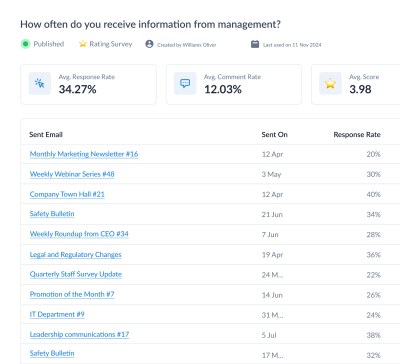

7. Clear data reporting that gives leaders visibility into impact
Think about the last time you sent an important internal email and leadership asked how it performed. Did people read it? Did it land? Did it drive action?
For many internal communicators, that’s where the answer gets uncomfortable.
GSIC 2026 reports that measurement remains a major challenge for internal communications teams, with nearly 50% finding it difficult to demonstrate impact, especially when relying on generic marketing tools or Outlook alone. Without built-in reporting, teams are left piecing together partial data or relying on anecdotal feedback to explain results.
Basic email tools weren’t designed for leadership visibility. They make it difficult to quickly show engagement trends, compare campaigns, or summarize performance in a way that resonates with executives. As a result, internal communications impact often goes underreported, even when the work is effective.
Purpose-built internal newsletter software fills that gap. Real-time dashboards and exportable reports make it easy to show how newsletters perform across departments, locations, and time. Instead of scrambling for answers, communicators can share results with leadership confidently and consistently. This shift matters because leadership doesn’t just want activity updates. They want clarity. Clear reporting helps connect internal newsletters to engagement, alignment, and broader organizational goals.
Why it matters:
- Stronger leadership trust: Clear reporting builds confidence in internal communications decisions.
- Faster answers: Performance data is ready when leaders ask, not weeks later.
- More strategic conversations: Reporting moves discussions from “did we send it?” to “did it work?”
- Better visibility: Internal communications impact is easier to see and harder to overlook.
Get powerful email analytics and reporting features
Know exactly who is opening and engaging with your employee communications and company newsletters.
Explore analytics & reporting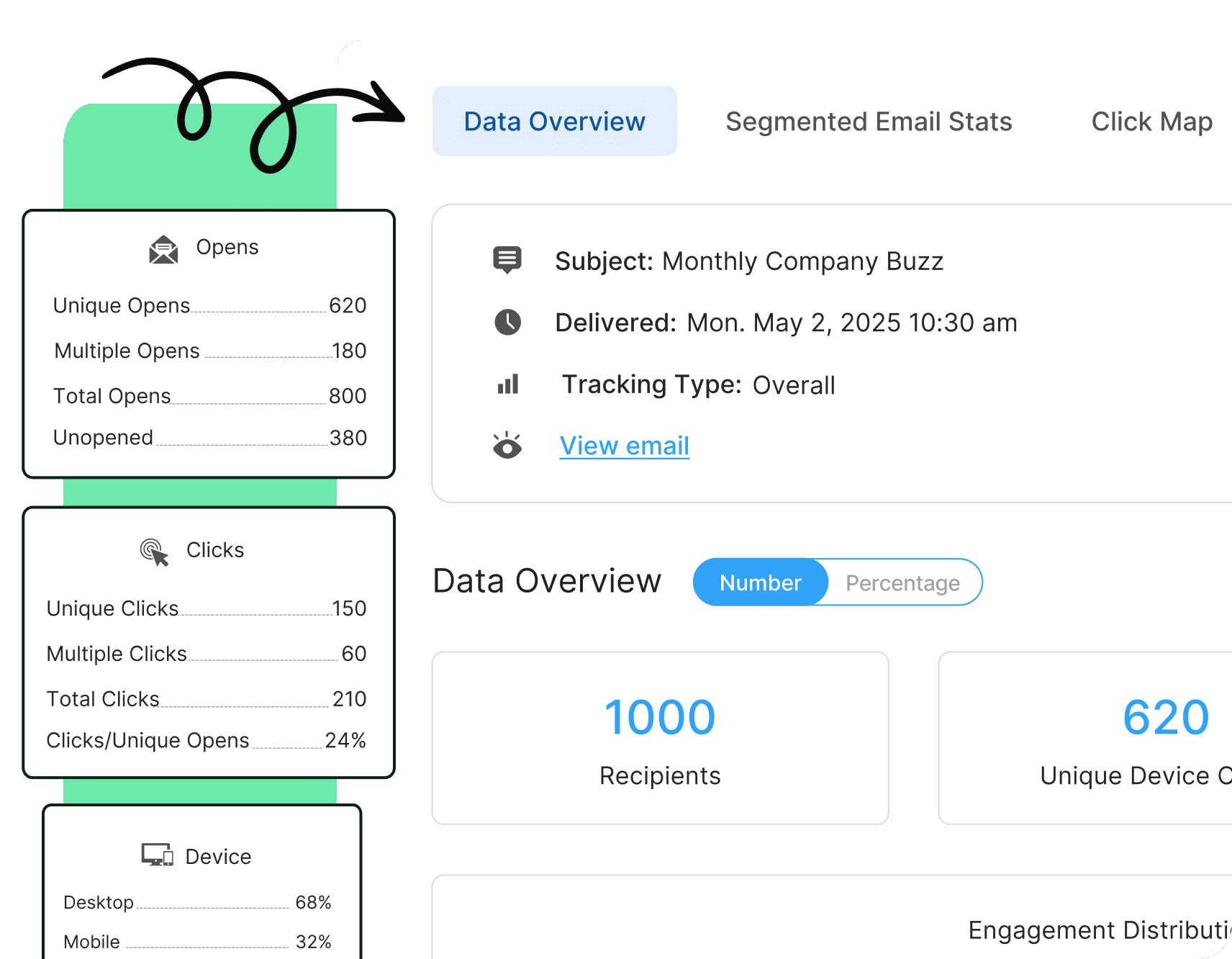

How We Selected the Best Internal Newsletter Software
Choosing internal newsletter software isn’t just about features. It’s about finding a platform that actually fits into how internal communications teams plan, send, and measure emails every day.
To build this list, we looked at each platform based on what matters most once the tool is actually in use. That includes how easy it is to personalize content, how quickly teams can build and send newsletters, and how clearly they can see what’s working after an email goes out.
40% of IC professionals are struggling to track and measure communication, making measurement their top challenge. This is why analytics, feedback, and reporting capabilities were weighted heavily. These criteria reflect real-world IC needs. From communications needs to delivering relevant, personalized updates to proving impact with clear data. We also looked at how well each platform fits into existing workflows, including native integration with Outlook and Gmail, how much manual work it eliminates through automation, and whether pricing is clear and transparent.
The table below outlines what we scored and why it matters, so you can see exactly how each platform was evaluated and decide which criteria are most important for your team.
| What We Scored | Why It Matters |
| Audience targeting and personalization | From basic merge fields to AI-driven personalization that builds unique digests for every employee. |
| Builder UX and Templates | A user-friendly, no-code builder with ready-made templates reduces formatting issues and speeds up turnaround. |
| Automation and Scheduling | Dynamic lists, recurring sends, and send-time optimization improve efficiency and employee reach. |
| Analytics and Feedback | Real-time tracking of opens, clicks, pulse surveys, and sentiment helps teams improve and prove impact. |
| Deliverability and Integrations | Outlook and Gmail add-ins, HRIS sync, and reliable sending infrastructure ensure consistent reach. |
| Pricing Clarity | Transparent pricing tiers make it easier to budget, compare tools, and scale without surprises. |
Top 10 Internal Newsletter Software Solutions for 2026
Here’s our breakdown of the top internal newsletter software tools for 2026. The tools below are selected based on real-world internal communications needs, not just feature lists. We’ve looked at how each platform performs in practice, where it stands out, and which types of teams it’s actually a good fit for.
1. ContactMonkey – best overall internal newsletter software for Outlook and Gmail users
If your internal comms team lives in Outlook or Gmail, ContactMonkey is the most complete “do-it-all” option on this list. It turns your everyday email client into a full internal newsletter platform with a builder, targeting, analytics, and in-email feedback, without forcing employees to learn a new system or rely on marketing tools that weren’t built for internal audiences.
What makes ContactMonkey different?
Most tools can help you send an internal email. ContactMonkey is built to help you create better emails and newsletters faster, personalize them, and prove results with the same level of reporting marketing teams expect. That’s what separates it from basic employee email tools and generic marketing platforms.
Drag-and-Drop Builder and workflow: ContactMonkey offers an intuitive drag-and-drop email builder for Outlook and Gmail, so internal communicators can create newsletters without switching tools or touching HTML. Text, images, buttons, dividers, and layout sections can be added and rearranged quickly, making it easy to build clean, readable employee newsletter designs.
The builder also supports multimedia email enhancements, including embedded images, videos, and interactive elements like polls, which help teams move beyond text-heavy updates. A built-in email template gallery gives teams a strong starting point for common use cases, such as weekly newsletters, leadership updates, and change communications, while maintaining consistent branding across sends.
From a workflow perspective, ContactMonkey is designed to reduce back-and-forth. Drafting, reviewing, and editing happen in one place, which helps teams move from draft to send faster and with fewer formatting issues.
Audience targeting and personalization: Personalization is one of the biggest differences between a basic internal email and a newsletter employees actually pay attention to. ContactMonkey is designed to make personalization scalable, without creating extra work for internal communications teams.
Dynamic content is the main differentiator. Teams can build a single newsletter and control which sections appear for different audiences. A global send can still feel local, with region-specific updates, role-based information, or department announcements automatically shown to the right employees. This reduces the need to create multiple versions of the same email while improving relevance for readers.
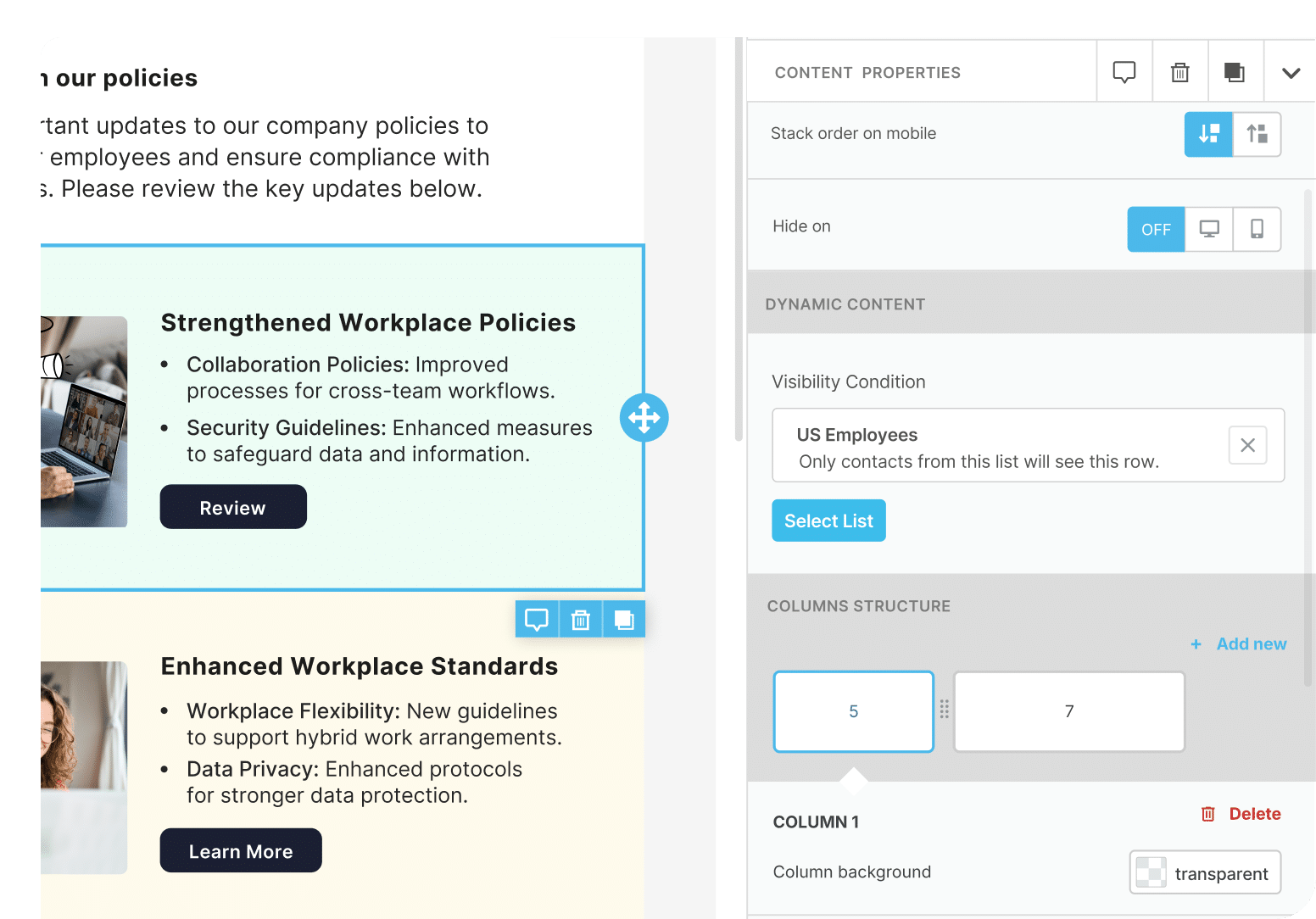

Audience segmentation makes targeting straightforward. Newsletters can be sent based on department, role, or location, helping ensure employees receive information that applies to them. Over time, this reduces inbox fatigue and improves engagement because employees aren’t skimming past irrelevant updates.
ContactMonkey also supports lightweight personalization through merge tags for details like name or location, adding a personal touch where it makes sense without complicating the workflow.
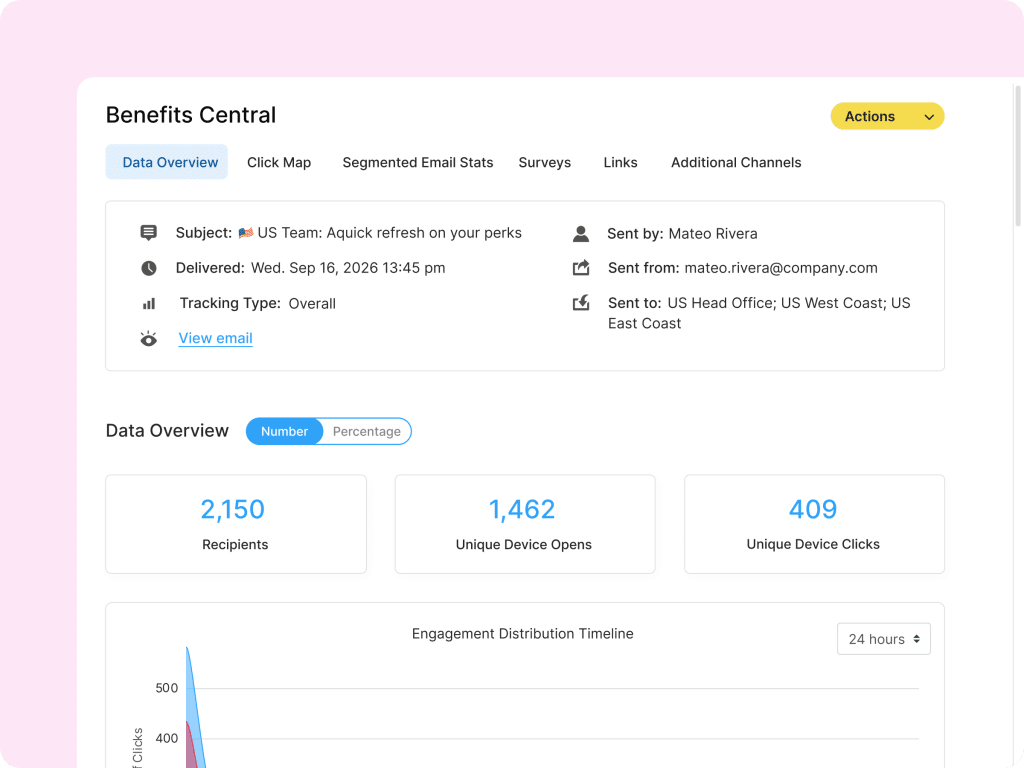
Analytics and feedback: Analytics is where ContactMonkey clearly separates itself from basic email tools. Instead of guessing how newsletters perform, internal communicators get real-time visibility into how employees actually engage with content.
ContactMonkey provides live dashboards that track opens, clicks, click-to-open rates, and read time, giving teams a clear picture of what employees are reading, skimming, or ignoring. This goes beyond surface-level metrics and helps communicators understand whether key messages are landing or getting lost in busy inboxes.
Feedback is built directly into the newsletter experience. With employee newsletter surveys, emoji reactions, and pulse-style questions, employees can share sentiment without leaving the email, making participation easy and measurable. This allows teams to capture quick feedback on leadership messages, change initiatives, or company updates while the content is still top of mind.
Performance benchmarks add useful context. Many ContactMonkey customers see average open rates around 70% and click-through rates in the 20–30% range, well above typical internal email benchmarks. This makes it easier to set realistic goals and demonstrate internal email ROI over time.
For leadership reporting, analytics don’t require manual work. Downloadable and shareable reports make it easy to summarize performance for executives, highlight trends across departments or locations, and demonstrate the impact of internal communications without pulling data from multiple tools.
Automation and integrations: Automation is where ContactMonkey helps internal communications teams save time and avoid manual list management. Instead of maintaining static distribution lists, ContactMonkey syncs with common systems like HRIS platforms, Active Directory, and Google Groups, keeping audiences automatically up to date as employees join, move teams, or change roles.
Scheduling tools make campaign planning more predictable. Teams can schedule newsletters in advance and support global audiences with time-zone optimized newsletters, ensuring messages are delivered when employees are most likely to see them. This is especially useful for organizations with distributed or hybrid workforces.
ContactMonkey also integrates directly into Outlook, allowing communicators to build, send, and track newsletters without leaving their inbox. For teams that need broader reach, newsletters can be extended beyond email through additional channels like Microsoft Teams, SharePoint or SMS, helping reinforce important messages without duplicating work. ContactMonkey’s latest integration with Appspace allows organizations to use Appspace Stories as a secure content feed for email campaigns, supporting a “create once, inform everywhere” approach across digital signage, intranet, and email.
Pricing: ContactMonkey uses tiered pricing plans called Launch, Grow, and Enterprise. Pricing is tailored based on specific IC team needs from core internal email creation to advanced analytics and segmentation. You can request a custom quote for the plan that fits your organization’s needs.
Best For: Organizations using Outlook or Gmail that want interactive newsletters, measurable engagement data, and scalable personalization with intelligence built-in to help prevent costly errors.
Unlock Internal Comms Superpowers
Discover why 10,000+ rely on us. See the internal email and employee newsletter platform in action.
Book demo

2. Cerkl Broadcast: AI-powered personalized employee digests
Cerkl Broadcast is designed to deliver highly personalized internal newsletters at scale. Instead of sending the same newsletter to everyone, they curate personalized newsletters for each employee based on role, behavior, and past content engagement.
At the core of Cerkl’s approach is AI-driven content curation. The platform automatically selects and prioritizes stories, updates, and announcements for each employee, helping reduce information overload while keeping newsletters relevant. This makes Cerkl a strong option for organizations with a large volume of internal content and diverse employee audiences.
Builder and workflow: Cerkl offers a no-code editor with reusable content blocks, making it easy to manage and publish content without technical expertise. Content can be distributed across multiple channels, including email, SharePoint, and Microsoft Teams, from a single workflow. This supports teams that want consistent messaging across platforms without recreating content for each channel. The workflow is built around continuous content delivery rather than one-off sends, aligning with Cerkl’s personalized digest model.
Audience targeting and personalization: Personalization is central to Cerkl’s functionality. The platform uses AI to assemble unique newsletters for each employee by analyzing engagement patterns and content relevance. Rather than relying on manual segmentation, Cerkl continuously adjusts what each employee sees based on how they interact with previous content. This approach helps minimize repeated or irrelevant updates and ensures newsletters stay aligned with individual interests over time.
Analytics and insight: Cerkl provides analytics focused on engagement quality, including engagement scores, topic performance, and personalization effectiveness. These insights help internal communicators understand which content resonates most and how personalization impacts employee newsletter performance over time.
Pricing: Cerkl Broadcast offers a flat pricing tier starting at $799 per month, with unlimited sends included.
Best for: Large organizations that want AI-driven personalization and automated employee digests to manage high content volume without manual segmentation.
3. Poppulo — Built for deep enterprise analytics
Poppulo is a long-established enterprise internal communications platform, particularly common in large, global organizations with complex governance and reporting structures. It offers a broad suite of capabilities that extend beyond email, including digital signage, intranet, and mobile features. For organizations seeking an all-in-one communications ecosystem, Poppulo emphasizes control, structured workflows, and centralized oversight. However, teams primarily focused on internal email often find the platform more complex than necessary for day-to-day newsletter execution.
Builder and workflow: Poppulo includes a drag-and-drop email builder that integrates with Outlook and supports structured, repeatable campaigns. Macros and content rules allow teams to create regional or departmental variants within a single campaign, which can be useful for global enterprises with formal approval processes. That said, some teams report that template customization requires additional support involvement, and flexibility can be more limited compared to fully self-serve builders. Organizations that prioritize speed, ease of use, and full template autonomy may want to evaluate how much control they require internally versus through vendor support.
Audience targeting and personalization: Personalization in Poppulo is primarily rule-based and segmentation-driven. Teams can target by department, role, or location, and the platform supports AI-assisted translation and send-time optimization for global audiences. For enterprises prioritizing structured segmentation across large, matrixed environments, this approach offers predictability. However, personalization tends to be less dynamic at the content-block level compared to platforms built specifically around email-first engagement.
Analytics and insight: Analytics is a core strength of Poppulo. The platform provides detailed reporting across device type, geography, department, and audience segment, making it well suited for organizations requiring global-level oversight. Organizations evaluating analytics depth should also consider reporting flexibility, data export capabilities, and how easily custom reports can be generated without additional configuration or add-on costs.
Pricing: Poppulo follows a modular, quote-based pricing structure, often tailored to enterprise deployments. Because it operates as a broader communications suite, pricing and implementation timelines may reflect the complexity of multi-channel integrations. Teams primarily focused on improving internal email performance may want to evaluate whether they need the full suite or whether a dedicated email platform with native Outlook integration can deliver faster deployment and lower total cost of ownership.
Best for: Large, enterprise organizations that prioritize advanced analytics, structured segmentation, and global reporting, and operate in environments where consistency, governance, and deliverability are critical.
4. PoliteMail — Outlook-based email analytics for traditional environments
PoliteMail is an Outlook-based internal email tool that has been in the market for many years. It is designed for organizations that want to enhance Outlook with tracking and reporting without adopting a broader internal communications platform. For teams prioritizing familiarity and minimal workflow change, PoliteMail offers a straightforward extension of Outlook’s native capabilities. However, organizations evaluating long-term scalability and modern architecture should understand how the platform is structured.
Builder and workflow: PoliteMail operates directly inside Outlook through a ribbon-based interface. Users can build newsletters using templates and layout tools without leaving their inbox. Because the platform is built on an older plugin architecture, performance depends more heavily on the local Outlook environment. Some teams report that complex layouts or large sends can impact Outlook performance. Organizations that require high-volume sending or cloud-based stability may want to compare plugin-based tools with newer add-in models designed for Microsoft 365. Customization options are functional but more limited than modern drag-and-drop builders. Teams that prefer fully self-serve template creation and more flexible layout control may find the experience less intuitive.
Audience targeting and personalization: Personalization in PoliteMail is relatively lightweight. Personalization capabilities focus primarily on basic merge fields, such as name or department. Audience segmentation is available, but dynamic content at the section or block level is limited. This makes the platform well suited for broad internal communications, but less adaptable for teams looking to deliver highly personalized and segmented messaging at scale.
Analytics and insight: PoliteMail provides core analytics, including open rates, click rates, and read time, accessible directly within Outlook. For organizations transitioning from basic Outlook sends, this level of insight represents a meaningful improvement. However, reporting flexibility is more limited compared to platforms that offer custom report builders, advanced segmentation, and API access for exporting internal email analytics into BI tools. But they do provide meaningful visibility for teams moving beyond “send and hope.”
Pricing: PoliteMail pricing starts at $639 per month for up to 1,000 employees, with costs increasing based on employee count and feature requirements.
Best for: Outlook-centric teams that want improved internal newsletter analytics and reporting within a familiar environment, without introducing new systems or significantly changing existing workflows.
5. Staffbase Email — Designed for app and intranet-led comms
Staffbase, formerly Bananatag, is part of the broader Staffbase employee communications suite. It’s built for organizations that want email to work alongside an intranet and employee app, with reporting that spans multiple channels. Staffbase is a strong fit when your communications strategy is ecosystem-first. If your main priority is improving internal newsletters specifically, it’s worth noting that email is one part of a larger platform, which can shape the product experience and roadmap.
Builder and workflow: Staffbase includes a drag-and-drop builder with a template library, brand kits, and structured approval flows. This supports teams that need consistency and governance across contributors, especially in organizations with formal review cycles. For teams that publish frequent newsletters and want maximum speed and flexibility, the workflow can feel more platform-driven than email-first. It’s a good choice when standardization matters most, and less ideal when newsletter teams want fast iteration and full template autonomy.
Audience targeting and personalization: Targeting is primarily group-based, using predefined employee segments like department or location. Staffbase also supports content tagging to help organize and distribute updates across channels.Personalization is effective at the segment level, but less flexible for teams looking to tailor content sections within a single newsletter for different audiences. If your goal is to send one master newsletter that adapts by audience, you may want to compare how each platform handles dynamic content.
Automation and analytics: Staffbase supports HRIS syncing and scheduled sends, and its major advantage is unified analytics across email, intranet, and mobile. If you care most about cross-channel reach and engagement, this is valuable. If email is the main channel you are trying to optimize, you may want to evaluate the depth and accuracy of email-specific reporting, how easy it is to export or build reports, and how much manual work is involved to get the insights you need.
Integrations and rollout considerations: Staffbase is commonly adopted as part of a broader platform rollout, which can make it a bigger implementation decision than an email-first tool. Organizations that rely heavily on Outlook-based workflows should also confirm how sending and building newsletters fits into existing email habits, since some teams prefer staying inside Outlook rather than moving to a separate web-based workflow.
Pricing: Pricing is quote-based and varies depending on whether Staffbase Email is purchased as a standalone product or bundled with the full Staffbase platform.
Best for: Organizations investing in an intranet and employee app strategy that want email as part of a unified, multi-channel platform.
6. Firstup — Managing communications across email, mobile, and SMS
Firstup is built for organizations that need to reach employees across multiple channels, especially when email alone isn’t enough. Rather than focusing solely on newsletters, Firstup is designed to orchestrate communications across email, mobile push, and SMS to improve overall reach. This makes it a strong option for companies with hybrid, frontline, or deskless workforces where not every employee checks email regularly.
Builder and workflow: Firstup includes a drag-and-drop designer that supports branded newsletters, onboarding communications, and compliance-related campaigns. Content can be created once and then distributed across multiple channels, reducing the need to recreate messages for different formats. Workflows are geared toward planned campaigns rather than quick, one-off sends, which works well for organizations running structured communication programs.
Audience targeting and personalization: Personalization in Firstup focuses primarily on delivery optimization rather than content-level customization. The platform uses AI to determine the best channel and timing for each employee based on past engagement patterns, helping ensure messages are more likely to be seen. While content personalization is more limited than in newsletter-focused platforms, this approach is effective for maximizing reach across diverse employee groups.
Analytics and insight: Firstup’s analytics emphasize reach and coverage. Teams can track what percentage of employees received and interacted with key messages across channels, rather than focusing only on email-specific metrics like opens and clicks. This is particularly useful for leadership communications, safety updates, and compliance messaging where confirmation of delivery matters more than detailed content engagement.
Pricing: Firstup offers three tiers: Essential, Advanced, and Premier, with pricing available through a quote-based model depending on scale and feature requirements.
Best for: Organizations with hybrid, frontline, or deskless teams that need to coordinate messages across email, mobile, and SMS to ensure important communications reach as many employees as possible.
7. SnapComms — Mandatory-read messaging for compliance
SnapComms is designed for situations where message visibility isn’t optional. It focuses on ensuring critical communications are seen, acknowledged, and recorded, making it well-suited for compliance-driven use cases rather than ongoing engagement. The platform is commonly used in regulated environments where organizations need confirmation that employees have received and read specific messages.
Builder and workflow: SnapComms supports internal communications delivered through email as well as desktop and system pop-ups. Messages can be configured to reappear until employees acknowledge them, helping ensure important updates aren’t missed or ignored. This workflow prioritizes certainty over flexibility. It’s effective for mandatory communications, though less suited for regular newsletters or storytelling-style internal content.
Audience targeting and personalization: Personalization is limited and intentional. Messages are typically targeted by role, department, or system access, with the primary goal being visibility rather than tailored content. This keeps delivery straightforward and consistent for compliance purposes.
Analytics and confirmation tracking: Analytics in SnapComms focus on delivery and acknowledgment, rather than engagement depth. Teams can track who received a message, who confirmed receipt, and who has not yet acknowledged it. These records are especially useful for audits, policy rollouts, and regulatory reporting.
Pricing: Pricing is typically quote-based and varies depending on deployment size and feature requirements.
Best for: Organizations in highly regulated industries such as finance, healthcare, manufacturing, or utilities that need proof of message delivery and acknowledgment for compliance or safety communications.
Pro tip: SnapComms works best alongside a dedicated internal newsletter platform. Many organizations use tools like ContactMonkey for engagement-driven newsletters and reserve SnapComms for mandatory alerts and compliance messaging.
8. Workshop — A lightweight tool for SMBs and smaller teams
Workshop is a newer internal newsletter tool built for simplicity and speed. It’s a good option for small teams that want a clean, web-based way to design newsletters without IT involvement or complex setup. It’s often most attractive when budget and ease of use are the top priorities. Teams with more advanced needs (like Outlook-based workflows, deeper reporting, or more flexible segmentation) may outgrow it as their program scales.
Builder and workflow: Workshop offers a Canva-style drag-and-drop builder with reusable blocks, making it easy to assemble newsletters quickly. Teams can add text, images, buttons, and sections without design or coding experience. Light collaboration features, such as shared templates and approvals, support small teams that want a simple workflow without extra process.
Because Workshop is web-based, it works best for teams that are comfortable building and sending outside of Outlook. If your organization relies heavily on Outlook distribution lists, shared inbox sending, or executive assistant workflows, it’s worth considering whether a native Outlook add-in is a requirement.
Personalization and targeting: Workshop supports basic audience targeting and simple personalization. For many small organizations, that’s enough for broad sends like weekly updates or leadership messages. However, personalization is less flexible for teams that want one master newsletter that adapts for multiple audiences within a single send. If you need more complex segmentation or audience-specific content blocks, you may want to compare how each platform handles dynamic content at scale.
Analytics and reporting: Workshop provides core performance metrics like open and click rates, giving teams a basic read on whether employees are engaging. If leadership reporting is a priority, or if you need deeper insight by department, location, or employee group, Workshop’s reporting may feel limited compared to platforms built for more detailed internal newsletter analytics and segmented reporting.
Pricing and long-term fit: Workshop is positioned as one of the more affordable options on the list, with entry pricing starting around $250 per month for up to 250 employees. For smaller teams, it can be a practical way to get started quickly. As teams grow, it’s worth considering long-term needs like Outlook integration, advanced analytics, and customer support depth, especially if internal newsletters become a core channel.
Best for: Small teams that want a simple, web-based newsletter builder at a lower price point and don’t need Outlook add-ins or advanced reporting.
9. Connecteam — Mobile-first communication for frontline teams
Connecteam is a mobile-first employee communications platform built for organizations where most employees aren’t sitting at a desk or checking email regularly. Instead of relying on inbox-based newsletters, it delivers updates through a mobile app using push notifications and in-app announcements. This makes Connecteam a strong option for industries like retail, hospitality, construction, and field services, where speed and accessibility matter more than long-form email content.
Builder and workflow: Connecteam includes a drag-and-drop composer that makes it easy to create short updates, announcements, and lightweight newsletters. Teams can add text, images, GIFs, polls, and quick-action shortcuts, which works well for fast-moving, operational communication. The workflow is optimized for quick publishing rather than detailed review cycles, supporting teams that need to share updates in real time.
Personalization and targeting: Targeting is primarily team-based. Communicators can send messages to specific locations, roles, or work groups, helping ensure frontline employees receive information that applies to their day-to-day work. While personalization is less granular than email-focused employee newsletter software, it’s effective for reaching the right group quickly.
Automation and analytics: Connecteam supports HRIS syncing to keep employee lists up to date.Analytics dashboards show basic engagement metrics, including opens and clicks by team, giving managers visibility into engagement tracking at an operational level.Reporting is designed for operational awareness rather than deep campaign analysis, which aligns with its frontline focus.
Pricing: Connecteam pricing starts at $29 per month for up to 30 users, with additional tiers available as teams grow.
Best for: Organizations with frontline or deskless employees that need fast, mobile-first communication through push notifications and simple newsletters, rather than traditional email-based campaigns.
10. Nectar — Recognition-led internal communications
Nectar is primarily an employee recognition platform, with internal newsletters playing a supporting role. Its strength lies in connecting recognition, rewards, and culture updates into a single experience, rather than operating as a standalone internal newsletter tool. For organizations where recognition is a central part of engagement strategy, Nectar helps reinforce culture through regular, automated communication.
Builder and workflow: Nectar offers a web-based editor that supports collaborative creation of HR and leadership updates. Newsletters are typically used to highlight employee recognition, milestones, and culture initiatives, rather than long-form internal announcements. The workflow is straightforward and works well for recurring updates, such as weekly or monthly recognition digests.
Personalization and targeting: Personalization in Nectar is closely tied to recognition activity. Content is often automatically generated based on employee achievements, peer recognition, or rewards, creating newsletters that feel timely and relevant without manual effort. Targeting options are more limited compared to dedicated internal newsletter platforms, but sufficient for culture-focused communication.
Automation and analytics: One of Nectar’s core strengths is automation. Recognition digests can be sent automatically on a recurring basis, reducing manual work for HR and internal communications teams. Analytics focus on basic engagement metrics such as opens and clicks, along with participation in recognition programs. While reporting is not as deep as enterprise newsletter platforms, it provides visibility into how recognition content is received.
Pricing: Nectar pricing starts at $5 per user per month, billed annually, making it accessible for organizations that want to pair recognition with lightweight internal communications.
Best for: Culture-driven organizations that want to connect employee recognition with internal communications, using newsletters to reinforce appreciation, values, and engagement rather than deliver complex, segmented updates.
Internal Newsletter Software Comparison Snapshot 2026
| Platform | AI Personalization | Outlook / Gmail Add in | Entry Price | Best for |
| ContactMonkey | Dynamic segmentation, AI assistant, ConfidenceCheck | Native | Tiered pricing with custom quote (Launch, Grow, Enterprise) | Outlook and Gmail users needing analytics, interactivity, and segmentation |
| Cerkl Broadcast | Full AI curated digests | Optional | $799 per month | AI driven personalization at scale |
| Poppulo | Rule based targeting + AI assist | Yes | Quote based | Enterprise analytics depth and global reporting |
| PoliteMail | Merge fields only | Native | $639 per month (1,000 users) | Outlook only teams prioritizing simplicity |
| Staffbase Email | AI tagging + scheduling | Yes | Quote based | Enterprises using app and intranet ecosystems |
| Firstup | AI driven channel delivery | No | Quote based | Multi channel reach across email, mobile, and SMS |
| SnapComms | None | No | Quote based | Compliance and mandatory read confirmations |
| Workshop | Merge fields | No | $250 per month (250 users) | SMBs needing easy, branded newsletters |
| Connecteam | Segment based targeting | No | $29 per month (up to 30 users) | Frontline and mobile first teams |
| Nectar | Segment based targeting | No | $5 per user per month | Recognition driven communications and culture programs |
Internal Newsletter Case Studies
Real-world results help bring internal communications strategy to life. The case studies below show the impact of purpose-built internal newsletter software in action.
University of North Texas saved 3 hours per newsletter
With a lean IC team and a high volume of newsletters, the University of North Texas needed a faster way to work and clearer insight into what was actually resonating with faculty and students. Before ContactMonkey, limited analytics made it difficult to know whether newsletters were being read or which content was effective. After adopting ContactMonkey for Outlook, UNT gained clear visibility into engagement and streamlined newsletter creation using built-in analytics and ready-made templates.
“The process is so much easier with ContactMonkey. It’s much smoother, and it shaved three hours off the time it took me to get each newsletter ready. I didn’t expect to save that much time until I actually started using it.”
— Amy Armstrong, Senior Communications Strategist, UNT
With ContactMonkey, the UNT team was able to:
- See exactly how many people were reading and engaging with each internal newsletter, instead of guessing based on sends alone
- Save three hours per newsletter by using pre-built HTML templates and ContactMonkey’s drag-and-drop builder directly in Outlook for Mac
- Analyze engagement over an entire semester at once using a centralized analytics dashboard, rather than pulling scattered reports
- Identify which links and content formats performed best through built-in link tracking, helping the team refine future newsletters
Exemplis achieved 70% open rates with internal newsletters
The Exemplis team needed a better way to keep employees aligned as their team was growing rapidly and had an increaseing number of product launches. Their key priorities were improving internal communication consistency, strengthening company culture, and tracking clear metrics to measure newsletter engagement and ROI. After adopting ContactMonkey, Exemplis gained real visibility into open rates, clicks, and reader behaviour, allowing the team to evaluate and refine their newsletters based on actual engagement data.
“Our team is obsessed with data. We always want to know the open rate, how many people clicked the link. Right now, we’re averaging a 70% open rate on our weekly communication to the team with click rates hovering between 20–30%. Before using ContactMonkey I wouldn’t have had any of that data.”
— Corey Kachigan, Employee Engagement Lead, Exemplis
How ContactMonkey helped Exemplis:
- Monthly pulse surveys, weekly comments, and frequent ratings enabled lightweight check-ins, driving ongoing engagement and feedback.
- Centralized communication made it easier to share timely, interactive updates across teams, including during seasonal hiring cycles.
Built-in analytics and reporting provided clear, measurable ROI and showed exactly what content resonated with employees. - Intuitive design and Outlook integration reduced newsletter errors and supported more consistent, data-driven communication experiences.
Key Takeaways for Choosing the Right Employee Newsletter Platform
There’s no single “best” internal newsletter tool for every organization. The right choice depends on how your team works today and what you need to prove tomorrow.
- If you send from Outlook or Gmail: ContactMonkey offers the most complete experience, combining native integration with analytics, interactivity, and scalable personalization. For teams that live in email, this minimizes friction while maximizing insight.
- If proving impact is a priority: Analytics depth should be non-negotiable. Platforms like ContactMonkey and Poppulo stand out here, which matters given that 72% of internal communications leaders still struggle to measure impact.
- If compliance and confirmation matter: Tools like SnapComms are purpose-built for mandatory-read messages and acknowledgment tracking, making them better suited for regulated environments than traditional newsletters.
- If you’re a small or growing team: Workshop offers a strong balance of ease, design quality, and affordability, especially for teams that want professional newsletters without complex setup or IT involvement.
Ultimately, most teams benefit from evaluating platforms across three core pillars:
- Integration fit: How well the platform works with Outlook or Gmail and connects to systems like HRIS or directories.
- Analytics maturity: The ability to track opens, clicks, feedback, and export data in a way leaders can understand.
- Employee experience: How personalized, interactive, and accessible newsletters feel to employees receiving them.
When those three pillars are aligned, internal newsletters become easier to manage, more engaging for employees, and far easier to defend to leadership.
Ready to Turn Your Internal Newsletters Into Real Engagement?
Internal newsletters shouldn’t feel like a checkbox. They are the backbone of employee connection. When built with intention, they’re one of the few channels that can consistently reach employees across different roles and locations.
Today’s IC teams need a platform that helps them create engaging content, gather real employee feedback, and clearly understand what’s working. When engagement is visible and measurable, newsletters become a strategic tool that supports two-way communication and builds trust, clarity, and alignment across the organization.
ContactMonkey gives internal communicators the ability to do exactly that. With powerful analytics, built-in surveys, and seamless integration with Outlook and Gmail, teams can design better newsletters, prove impact, and drive real employee engagement. If you’re ready to turn internal emails into meaningful communication, it’s time to see ContactMonkey in action.
See why leading internal communications teams rely on ContactMonkey to measure, improve, and scale employee newsletters. Book a demo to learn more!