

According to the CDC, more than 1 in 4 adults (over 70 million Americans) live with a disability. Many of them are employees, faculty, nurses, and students working inside the very public institutions meant to serve them. But the internal emails those institutions send are failing them, and a federal deadline is about to make that a legal problem.
Every day, public institutions send millions of internal emails: benefits enrollment reminders from HR departments, protocol updates from hospital administrators, policy changes from university leadership, scheduling notices from library managers, and emergency procedure alerts from fire departments.
Most of those emails are written with good intentions. Someone on a team sat down, drafted a message, chose a template, and hit send. They wanted to communicate clearly and to help.
But for a significant portion of the employees and students receiving those emails, “clearly” isn’t what arrives. What arrives is a wall: Images without descriptions, links without context, text that blends into its background, information that only makes sense if you can see color. And behind that wall are real people, trying to do their jobs and access what they’re entitled to, unable to get through.
This is the quiet accessibility crisis hiding in public sector inboxes. And with a federal compliance deadline of April 24, 2026 bearing down on most public institutions, it’s no longer something that can be pushed to the bottom of the priority list. Compliance isn’t optional, and with the right tools, it doesn’t have to be hard.
Let’s Meet the People Who Need Accessibility to Be Met
Maria, 47, is a faculty member at a state university. She has macular degeneration (an eye condition that blurs and distorts central vision) and relies on a screen reader to navigate her inbox. When HR sends an email about an open enrollment deadline for benefits, the key details are embedded in a banner image with no alt text. Her screen reader skips it entirely. A link that says “Click here to enroll” tells her nothing about where it leads or what it opens. She misses the deadline.
DeShawn, 21, is a sophomore student. He has deuteranopia, a form of color blindness that makes red and green indistinguishable. His university’s registrar sends an email outlining which courses he still needs to complete for graduation, marking required courses in red and completed ones in green, with no other visual cues. To DeShawn, the whole list looks identical. He registers for the wrong courses and doesn’t find out until his advisor flags it…a semester too late.
Priya, 38, is a nurse at a public hospital. She has dyslexia. Dense, unstructured text takes significantly more effort for her to process. When the hospital sends a lengthy internal email about updated patient care protocols, there are no headings or sections to help her navigate it. She reads it three times, still unsure she caught everything. In a clinical environment, missing a protocol update is a risk.
Three people, three conditions, three organizations sending internal emails with good intentions that still failed the people they were meant to serve, and they are far from alone.
Know Their Rights: It’s Illegal Not to Offer Accessibility
Here’s something worth sitting with: Maria, DeShawn, and Priya aren’t just underserved. Under federal law, they’re being failed.
The Americans with Disabilities Act (ADA) has long required public entities to provide equal access to their programs and services, including how they communicate with their own employees and students. In April 2024, the Department of Justice made this concrete by issuing a final rule under ADA Title II, formally establishing WCAG 2.1 Level AA as the technical standard for digital accessibility. Critically, the rule mandates that both public-facing and internal digital assets of state and local governments meet accessibility standards, extending to internal tools and communications used by government employees and students alike.
That means the HR benefits email Maria couldn’t access isn’t just a design oversight; it’s a potential ADA violation. The course registration email DeShawn misread because it relied solely on color isn’t just a UX problem; it’s an effective communication failure under federal law. And the protocol update Priya had to read three times because it lacked structure? In a clinical setting, that’s not just a compliance issue; it’s a patient safety risk.
People with disabilities have the legal right to receive the same information, at the same time, as everyone else, whether they’re a member of the public or an employee of the institution. When a public institution sends an inaccessible internal email, it isn’t cutting corners; it’s denying someone access to information they are legally entitled to. And with the 2024 rule now in effect, regulators have a clearer standard than ever to enforce against.
The compliance deadlines make this concrete:
- Large Entities (serving 50,000+ people): April 24, 2026
- Small Entities (serving fewer than 50,000 people): April 26, 2027
This Isn’t Just About Websites Anymore
For years, digital accessibility conversations have centered on websites. Make sure your site works with a keyboard. Add captions to your videos. Give your images descriptive alt text.
All of that still matters. But there’s a channel that’s been quietly overlooked, one that public organizations use constantly to reach the people who work and study within them.
Email.
Internal comms emails aren’t marketing emails. They’re communications that employees and students need to receive and understand to do their jobs and access what they’re entitled to. And right now, for a significant portion of your internal audience, they may not be landing that way.
The Buyer’s Guide to Internal Communications Software
We did the research, so you don’t have to.
Get the guide

So What Does “Accessible Email” Actually Mean?
WCAG 2.1 Level AA sounds intimidating, but in the context of email, it comes down to a handful of things that are very fixable once you know to look for them:
Alt text on images: Every image in your emails needs a text description so screen readers can communicate its meaning. If the image is purely decorative, mark it that way. If it contains important information, describe it.
Color contrast: Regular body text needs a contrast ratio of at least 4.5:1 against its background. That crisp, modern light-gray-on-white design that looks great in your brand guide? It probably doesn’t pass.
Logical heading structure: People using screen readers often navigate by jumping between headings. If your email is a single wall of text with no structure, it’s exhausting to move through.
Descriptive links: “Click here” tells a screen reader user absolutely nothing. “View your appointment details” tells them exactly what they need to know.
Minimum font size: Small text isn’t just hard to read for people with low vision; it can be a compliance issue.
None of these are complicated in isolation. The challenge is catching them consistently, across every email, every time.
How ConfidenceCheck Helps
ConfidenceCheck offers organizations two powerful tools to work with.
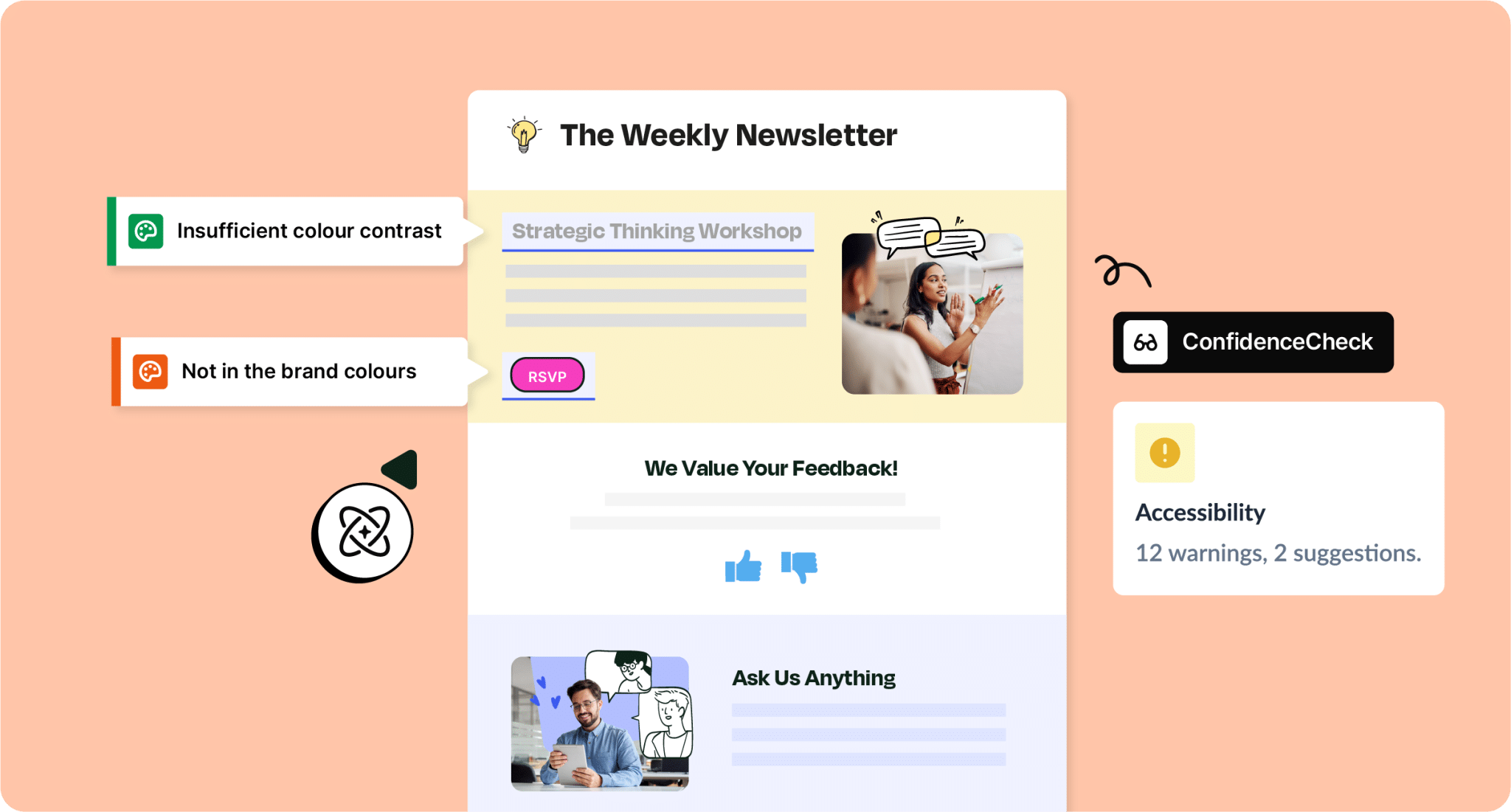
Accessibility Check is built to identify the issues that matter most under WCAG 2.1 Level AA right in the moment before you send, when they’re still easy to fix. It covers the criteria that directly affect whether your emails work for everyone: color contrast (including the 4.5:1 threshold required for body text), alt text, heading structure, font size, and descriptive links – the exact things that show up in an accessibility audit and determine whether Maria, DeShawn, and Priya can actually use what you sent them.
The Custom Check takes it further. Your organization can define and add its own rules on top of the baseline, so the standards you’re held to are baked directly into your sending workflow.
Examples:
- A university can enforce rules specific to HR and faculty communications, ensuring benefits enrollment emails and policy updates are accessible to every staff member and student.
- A public hospital can build in requirements for internal clinical communications, so protocol updates and shift notices reach every nurse and provider clearly.
- A public library can set standards for staff-facing emails, ensuring scheduling notices and internal announcements are readable by every employee they rely on.
We want to be upfront: passing our checks is a strong signal that your email is heading in the right direction, but it isn’t a formal WCAG certification. Email rendering varies across clients and devices in ways that make a blanket compliance guarantee unrealistic from anyone. What we can offer is a consistent, reliable way to catch common WCAG 2.1 AA issues before they reach your audience – and the ability to tailor those checks to your organization’s specific needs.
Think of it less like a compliance test and more like a safety net, and one that catches the things that are easy to overlook and hard to undo once they’re in someone’s inbox.


Back to Maria, DeShawn, and Priya
The version of these stories we want to help rewrite goes differently.
Maria’s HR benefits email arrives. Her screen reader moves through it cleanly, the banner image is described, the link tells her exactly where it leads, and the text is clear enough that she has everything she needs in under a minute. She enrolls on time, without a single phone call.
DeShawn’s course registration email is structured with clear labels, not just color. He sees exactly which courses he still needs, registers correctly, and stays on track for graduation.
Priya’s protocol update has headings, sections, and a logical flow. She reads it once, understands it fully, and goes into her shift confident she hasn’t missed anything.
That’s what accessible internal email looks like. And with April 24, 2026 approaching for public entities across healthcare, education, public safety, and social services, now is exactly the right time to make it the standard.
Let’s Make Sure You’re Ready by April 24, 2026
Maria deserves to access her benefits enrollment email without missing a deadline. DeShawn deserves to know exactly which courses he still needs without misreading a color-coded list. Priya deserves to read a protocol update once and walk into her shift fully informed.
And your organization deserves a clear, practical path to making that happen, before April 24, 2026 arrives.
Book a demo today and see how both work together to help your team send accessible, compliant emails before the deadline arrives.