If you’ve ever sent a company-wide announcement and later heard from a site supervisor that half their crew never saw it, you already know the problem this guide tackles. Most conversations about employee communications platforms are really conversations about desk-based employees, the people who spend their day in Outlook and Teams. At a lot of organizations, that leaves out most of the workforce.
The numbers back this up. ContactMonkey’s Global State of Internal Communications Report 2026 (GSIC) found that 70% of organizations have deskless or frontline employees, and 55% of those organizations support 100 or more of them. If your platform was chosen with only office workers in mind, there’s a good chance it’s quietly missing a large share of the people you’re responsible for reaching, and you may have no data telling you so.
In this guide, we’ll walk through what an employee communications platform is, why frontline and deskless employees are so hard to reach consistently, what a platform should do for them, and how to evaluate your options before you commit to one.
What Is an Employee Communications Platform?
So what counts as an employee communications platform? At its simplest, it’s software that lets your comms team create, send, target, and measure messages to the entire workforce from one place, so you aren’t relying on whichever channel happens to reach a given employee that week. Most platforms are built around internal email and employee newsletters, and the more complete ones add channels like SMS so a single campaign can follow employees to wherever they check for updates.
If you’re new to internal comms or need a refresher on the terminology, we’ve put together an internal communications glossary that covers the terms you’ll run into while comparing vendors.
For frontline teams, the detail that matters most is coverage. A platform built only around a corporate email directory will always miss employees who don’t have a company inbox, and in most organizations those are the same people working shifts on a plant floor, in a hospital unit, or out on a job site. This is where an employee communications platform has to earn its place next to the other internal communications tools your organization already pays for. Before you look at templates or AI features, ask a simpler question. Can this tool reach every employee on our roster, including the ones who never sit at a desk?
Why Is Reaching Frontline and Deskless Employees So Hard?
Anyone who has run comms for an organization with plants, stores, or field crews knows how this plays out. The message gets written, approved, and sent on time, and a good portion of employees still hear about it late or secondhand from a coworker. A few findings from our research help explain why this keeps happening across industries.
Most organizations now manage a frontline workforce
The size of the frontline workforce tends to surprise communicators who’ve spent their careers in corporate settings. GSIC 2026 found that 70% of organizations have deskless or frontline employees, defined as employees without a fixed workspace, and 55% of those organizations support 100 or more of them. Frontline populations under 100 employees are far less common. For most comms teams, reaching deskless employees is already part of the day-to-day job, whether or not their current platform was built to handle it.
How often do organizations communicate with frontline employees?
Looking at how often frontline employees hear from their organization tells a less comfortable story. GSIC 2026 asked communicators how frequently they reach frontline teams, and the answers point to a clear imbalance with desk-based staff.
- 51% of organizations communicate with frontline employees only one to two times a week. For a shift worker, that can mean several days without a single update from the organization while a desk-based colleague receives a handful every day.
- 16% communicate with frontline teams daily or multiple times a day. This group is worth learning from, because it shows a daily cadence with frontline employees is achievable once the right channels are in place.
- 13% report never communicating with frontline teams directly. In practice, those employees depend on supervisors, break-room posters, and word of mouth, and the comms team has no way to know which version of the message reached them.
- 72% of respondents say frontline engagement is important or very important to their organization. Set next to the frequency data, this tells us most organizations care about frontline engagement but haven’t yet built the communication habits to support it.
That mismatch shows up as a trust and alignment problem well before it appears in an engagement score. Most efforts to improve frontline employee engagement start with fixing how often, and through which channel, frontline employees hear from the business.
Does email still work for a deskless workforce?
Email tends to get written off quickly whenever deskless employees come up. A lot of frontline content positions SMS or app-based push notifications as the only real option and treats email as a desk-only channel. ContactMonkey’s Internal Email Benchmark Report 2026 points in a different direction. Mobile email engagement is highest in the industries with the most field-based and non-desk workers, led by Transportation and Trucking at 31%, followed by Education at 24% and Agriculture, Pharmaceuticals, and Utilities at 21% each.
For communicators, the takeaway is practical. Email still reaches deskless employees when it’s designed to be read on a phone, kept short, and paired with SMS for anything urgent. Dropping email entirely for this group usually means losing the channel that carries your longer content, like benefits explainers, policy changes, and leadership updates. The better question is which internal communication channels should carry which messages for each audience.

What Should an Employee Communications Platform Do for Frontline Teams?
Once you know who you’re trying to reach, the feature checklist starts to look different. The capabilities below make the biggest difference when a large share of your workforce works away from a desk, and they line up closely with what a solid deskless worker communication strategy needs to work in practice.
Mobile-first email design
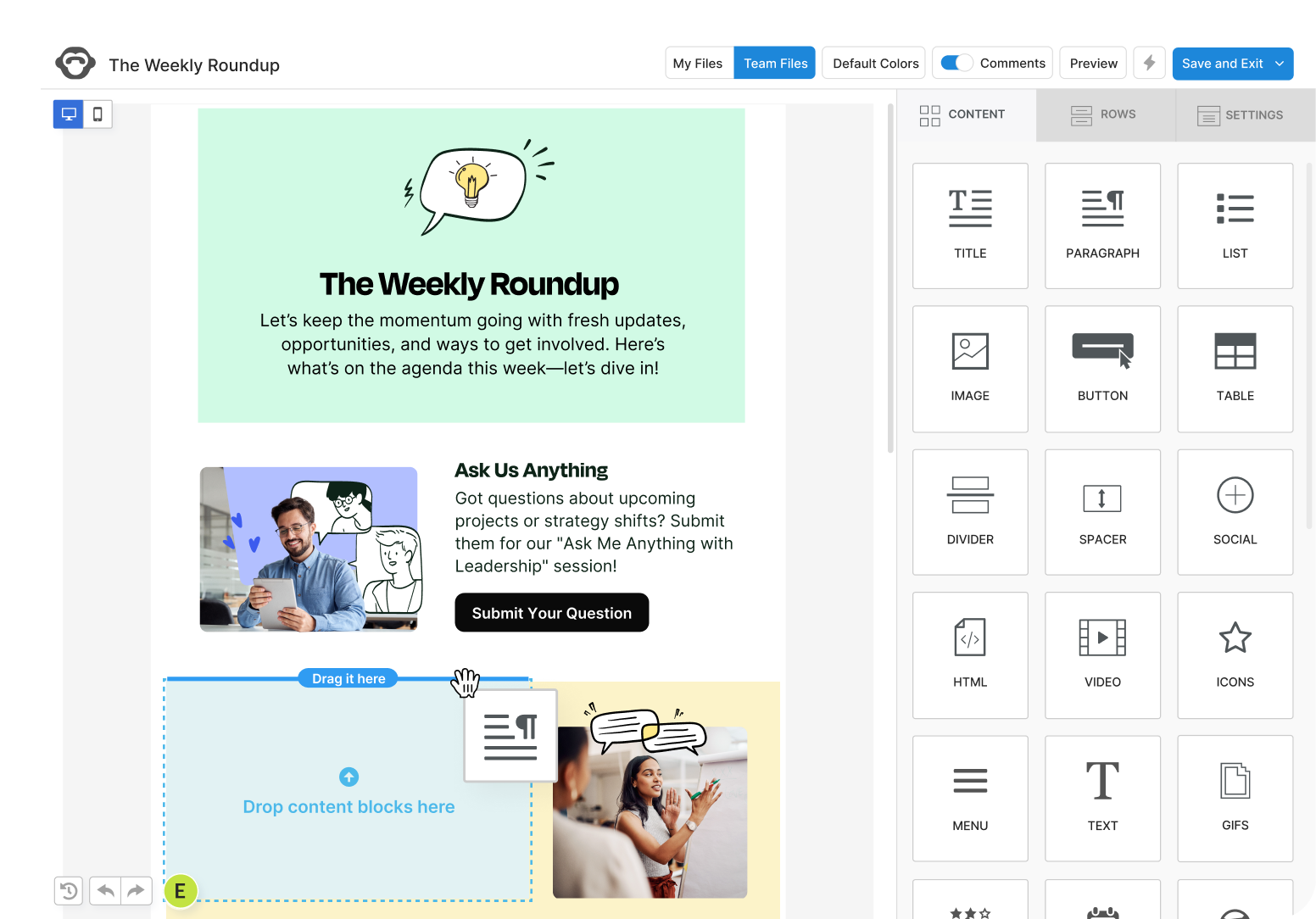
Deskless employees who do check email are far more likely to open it on a phone, often between tasks or on a break. That changes how a message needs to be built. Single-column layouts, short paragraphs, large buttons, and the key action near the top all matter more here than they would for someone reading on a large monitor. Templates from an email template builder that render responsively by default save you from redesigning every send for mobile. Before any frontline send goes out, preview it on your own phone the way a technician would see it between jobs.
SMS as a partner channel for email
Text messages get opened quickly and work on any phone, which makes them the right fit for time-sensitive and safety-critical updates like weather closures, shift changes, and incident alerts. They’re a poor fit for a benefits explainer or a quarterly leadership update. Strong SMS employee communications keep texts short and link to a fuller email or web page when there’s more to say. Look for a platform that runs SMS and email from the same audience lists so you aren’t maintaining two directories, and that handles employee consent and opt-outs for you.
No extra app to download
Asking a deskless employee to download, install, and log into yet another app adds friction that desk-based platforms never have to deal with. Adoption stalls, personal-device concerns come up, and the comms team ends up chasing logins instead of communicating. Platforms that reach employees through channels they already use, like text messages and email, remove that step entirely and let you reach frontline staff without running a separate rollout campaign first.
Segmentation by location, shift, or role
A closure notice for a distribution center in Ohio means nothing to a crew in Texas, and every irrelevant message teaches employees to ignore the next one. Audience segmentation by site, shift, region, or role keeps frontline updates relevant. The most useful setups sync with your HRIS so lists update automatically as people join, move, and leave. Dynamic content goes a step further by letting one email show different sections to different groups, so a single newsletter can speak to plant staff and office staff without two separate campaigns.

Analytics that break out frontline segments
A message being sent and a message being read are two different things, and that difference matters most for the employees you can’t see. Look for analytics that report on device type, read time, and engagement by location or segment, so you can tell whether a message reached someone on a phone in the field. Tracking internal email metrics for your frontline segments separately from the company-wide average is the clearest way to know whether your frontline strategy is working.


How Do You Evaluate an Employee Communications Platform for a Distributed Workforce?
Choosing a platform for a distributed workforce goes better when you start with your own people and work outward to vendors. A feature grid can tell you what a tool does, but it can’t tell you whether that tool fits the way your frontline employees work day to day. These three steps help keep the evaluation grounded in your workforce.
Map your workforce before you compare vendors
Start by building an honest picture of your workforce structure. How many employees are deskless? Which of them have a corporate email address, and which only have a personal phone number on file in your HRIS? What does your current open and read rate look like for that group specifically, separate from the blended company average? That baseline tells you how far you need to move and gives you something concrete to measure each vendor against. If you don’t have frontline data at all, that’s useful to know too, because it means measurement belongs near the top of your requirements list.
Test the frontline experience during demos
During demos, ask each vendor to send a real test message to your phone, then read it the way a frontline employee would. Check how quickly it loads, whether links work on mobile, and how easy it is to reply or give feedback. Ask how audience lists sync with your HRIS, how SMS consent and opt-outs are managed, and whether you can preview a message from a specific segment’s point of view. ContactMonkey’s Audience Preview, for example, runs a draft against AI personas built from your own employee segments, such as frontline workers or field teams, before it goes out.
Plan how you’ll report results to leadership
The platform you pick should make it easy to show leadership whether frontline communications are working. Jerilyn Hall, Employee Communications Manager at Mustang Cat, where 40 to 50% of the workforce is deskless, described where her team started.
“Before ContactMonkey, we had nothing. We had no benchmark. We had no idea what messaging was getting to our employees, how they were best receiving it.”
Mustang Cat had been sharing company-wide messages through image rotators with no way to track who saw them, and moving those communications into a trackable channel gave the team its first reliable view of deskless reach. Mark Kaplan, Global Communications Manager at BASF, described the kind of visibility that helps once that channel exists.
“ContactMonkey has been great in that I can download a report, attach it to an email, and send it to our top leadership and say, ‘Oh, wow. 88% of the organization opened this in the last 24 hours, I think we should do more of this.'”
If you need to build a case for new software internally, a business case calculator can help translate reach and engagement gains into numbers leadership can act on.
How First Onsite Used ContactMonkey to Reach Frontline Responders During Hurricanes
First Onsite is a restoration and property reconstruction company that responds to environmental disasters such as hurricanes across the United States and Canada. It has about 2,800 employees, and roughly 80% of them work on the front lines as skilled tradespeople who deploy whenever a disaster hits. For Toni Daylor, Director of Global Internal Communications, that meant most of the workforce rarely sat in front of a screen.
“A lot of [First Onsite employees] aren’t in front of a computer or a laptop.”
Before adding SMS, First Onsite relied on email to reach responders. With most employees depending on their phones for work communication, there was a real risk that someone would miss a mobilization notice or overlook details buried in a long email. In a disaster response, crews need to mobilize fast to prevent further damage, so a missed message has real consequences for customers.
First Onsite was already using ContactMonkey for email when Toni joined, and she added employee SMS specifically for crisis communication. Distribution lists let her limit each mobilization text to employees working near the affected area, so crews in other regions aren’t pulled into messages that don’t apply to them.
“Our most important [use of SMS] is our crisis communication. We had the hurricanes just a couple weeks ago, and I had to send out messages to mobilize people to get to where they needed to be.”
Email still carries a lot of First Onsite’s communication, including a monthly company-wide newsletter, an HR newsletter for leaders, and regular updates on organizational changes, training, and surveys. Every email is built in ContactMonkey’s email template builder, so it reads well on the phones most employees use. Toni also uses SMS for quick company-wide messages and survey links.
“ContactMonkey has been a huge improvement over just sending an email through Outlook.”
The engagement results came from treating analytics as an ongoing feedback loop. When First Onsite started tracking engagement, its monthly newsletter had a 55% open rate and a 40% read rate, measured as employees spending more than a minute reading. After reworking the newsletter based on that data and feedback from team members, open rates climbed to 100% and read rates reached 55%.
For comms teams with large frontline populations, First Onsite’s approach shows how the pieces in this guide fit together in practice. Urgent, location-specific updates go out by SMS to the people who need them, longer content stays in mobile-friendly email, and analytics show the team what to change next.
Try CoAuthor free — draft your next internal email with AI
Create your first 3 emails free, no commitment.
Try CoAuthor free

How ContactMonkey Helps You Reach Frontline and Deskless Employees
ContactMonkey was built for internal communicators, and reaching every employee, including the ones who never sit at a desk, is a big part of that job. Comms teams create and send internal email directly from Outlook or Gmail using responsive templates that read well on a phone, and can add SMS to reach employees who don’t have a company inbox at all. Both channels draw on the same audience lists, which stay current through HRIS integrations like Workday and BambooHR.
Segmentation by location, role, or department, along with dynamic content, keeps frontline employees focused on the messages that apply to their site or shift. Embedded surveys and emoji reactions give deskless employees a quick way to respond from a phone. On the reporting side, email opens, clicks, read time, and device data sit next to SMS delivery, replies, and opt-outs, so you can compare how each channel performs with each audience.

Two-way SMS that keeps frontline employees in the conversation
Text messaging has long been the fallback channel for urgent alerts, but most of those tools only move in one direction. An employee who gets a closure notice and wonders whether a nearby site is open, or who sees an open shift and wants to claim it, has to track down a manager to get an answer, and the comms team never learns whether the message was understood. Two-way SMS in ContactMonkey lets employees reply directly to a text. Replies land in a shared inbox where your team can read them as they come in, answer individual employees, and keep each person’s full conversation history in one thread.

Picture a plant that needs one more operator for a Saturday morning shift. An operations lead sends the request by text, hears back from the first employee who wants the shift, and confirms the details in the same exchange within minutes. Because ContactMonkey SMS communications use the same lists and segments you already build for internal email, you can target a text as precisely as an email, whether that’s everyone at one distribution center, the night shift at a single hospital, or all field staff in a region. Opt-outs are handled automatically when an employee replies STOP, and those employees keep receiving your email communications.
Each SMS send reports delivery, clicks, replies, and opt-outs at the individual level, so you can see which locations engaged and which need a follow-up from a manager. With SMS results sitting next to your email analytics, channel decisions come from your own data. A practical way to start is to pick one recurring message your deskless employees regularly miss, like a site closure, an open shift request, or a benefits enrollment deadline, send it by text alongside the email, and compare the results. Two-way SMS is available as an add-on to every ContactMonkey plan.
If you’re ready to see how email and two-way SMS can work together to reach every employee on your roster, book a demo today.
FAQ
How do you communicate with employees who don’t have computer access?
Communicating with employees who don’t have computer access works best when you combine mobile-friendly internal email with SMS for time-sensitive updates. Segmenting by location or shift keeps messages relevant to each employee’s site and role, and short texts that link to fuller content let you stay brief without leaving out detail.
Does SMS work better than email for frontline employees?
Whether SMS outperforms email for frontline employees depends on the message. SMS is the stronger choice for short, urgent updates like closures, shift changes, and safety alerts. Email stays effective for longer content when it’s built for mobile, as the Internal Email Benchmark Report 2026 shows in deskless-heavy industries. Most comms teams get the best results by using both and matching each message to the channel that suits it.
What features should an employee communications platform have for distributed teams?
For distributed teams, look for mobile-first email design, SMS with two-way replies, location- and shift-based segmentation synced to your HRIS, and analytics that report on device type, read time, and engagement by segment. Together, these show whether messages are reaching employees away from a desk.
How do you measure employee engagement among frontline employees?
Measuring frontline engagement starts with separating your frontline segments from the company-wide average. Track open rates, read time, click rates, and SMS replies for those segments specifically, since blending them with desk-based employees can hide whether your frontline strategy is working.